Before you deploy any Agents, read the prerequisites for Agent deployment and make sure that your environment is ready.
ControlUp for Desktops supports NoTouch OS version 3.3.432 or higher. The integration installs the Agent version that is packaged with your Stratodesk OS version.
Before You Begin
You'll need your ControlUp tenant name and device registration code. To get these values, go to Devices > Configuration > Downloads.
.png)
Integration Setup in Stratodesk
To set up the integration in Stratodesk:
-
Go to your NoTouch OS configuration and select Services > ControlUp.
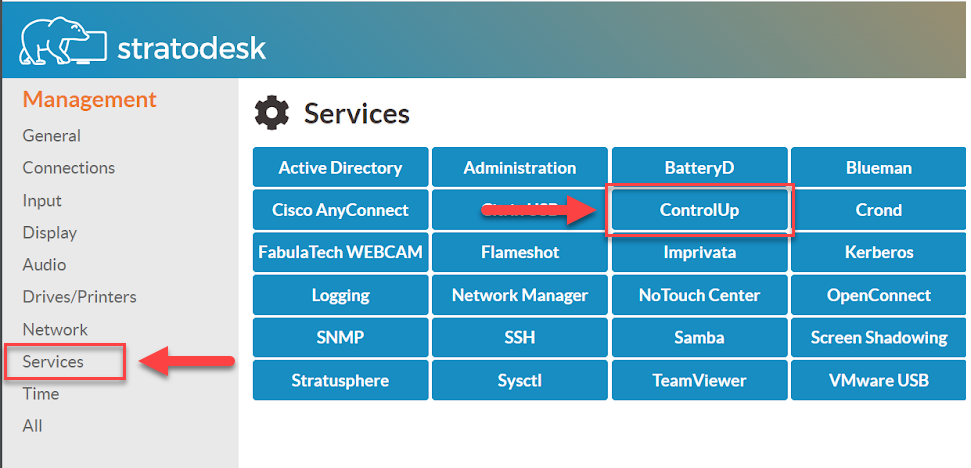
-
Enable Start ControlUp EdgeDX and paste your tenant name and device registration code.
-
Save your changes in Stratodesk.
After you save your configuration changes, the Agent is installed on the device and automatically connects to your ControlUp environment.
Updating the Agent
The Agent is built into Stratodesk NoTouch OS, so you can't manually update the Agent. Contact Stratodesk if you need to use a newer version of the Agent.
Troubleshooting
You can access the Agent log files from a terminal on the Stratodesk device. To learn how to access the log files and confirm that the Agent has been installed correctly, read this ControlUp blog.
Enable NTP Time on the Device
If the Agent is installed but you aren't able to see the device in ControlUp, make sure that the Stratodesk device uses NTP time. For details on how to enable NTP time, see the Stratodesk documentation.