Licensed users
This feature is available only to users who are licensed for it.
Your organization administrator must enable the use of the AI Assistant for your organization.
Our AI Assistant for IT Operations is an intelligent AI agent, seamlessly integrated into the ControlUp platform. As a ControlUp user, you can now interact with your IT environment using natural language. The AI Assistant functions as a powerful orchestrator, capable of interpreting user intent and executing complex, multi-step actions. For example, you can now use natural language for:
Troubleshooting devices, machines, and applications
Performance metrics
Run actions
Synthetic Monitoring scout data
ControlUp users and roles
Suggestions for automation of common tasks such as password resets
Content in our public Knowledge Base
The AI Assistant can significantly reduce the burden on human service desk agents and IT administrators, allowing them to focus on higher-value, more complex work.
Default Permissions
This feature is available by default only to users who have the admin role in the DEX platform. If you want other users to access, add the permission to those users.
Access ControlUp’s AI Assistant
You can find the AI Assistant in the right side of the top bar of every ControlUp module:
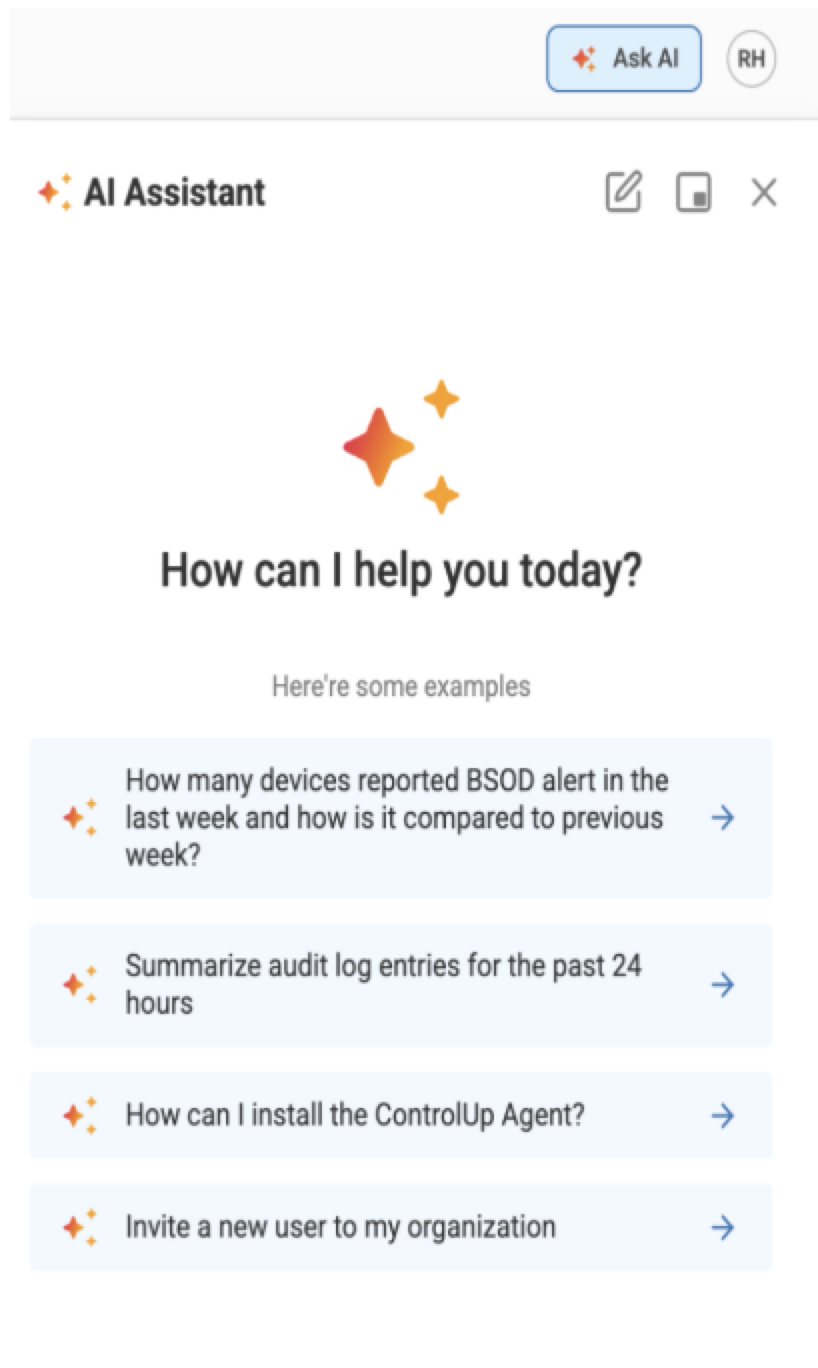
When you open the chat, you can see suggestions for chats you may want to start with the AI Assistant. These include requesting a summary of auto log entries, invite a new user to your organization, and how to configure SAML sign-on.
Run Actions
You can use natural language to run actions from the AI Assistant. The AI Assistant prompts you for approval before running any action. Currently, actions in the following product areas are supported. Refer to our public API documentation for details on available actions within each area.
Platform (for example, inviting users or updating organization settings)
Synthetic Monitoring
Workflows
To run actions from the AI Assistant, you must have the permission Allow AI Assistant Actions AND the relevant permission for the specific action you are performing. The AI Assistant can only perform actions that you could already perform yourself in the product UI.
Attach Files
You can now upload and attach files directly in the AI Assistant chat and have the AI analyze their content as part of the conversation context, making it easier to troubleshoot issues and get more relevant answers.
Image files for screenshots and visual errors
.png
.jpg
.jpeg
.gif
.webp
Text and data files to use for diagnostics:
.txt
.log
.csv
.json
.pdf
To attach a file, drag & drop into the chat window, or use the file picker. You can attach up to 5 files per message at a maximum 10 MB per file. You can preview and remove files that were attached before sending.
Files are securely processed and temporarily stored. They are isolated only for your tenant organization.
AI Assistant FAQ
General
How does it work? AI Assistant is powered by the Pulse AI platform, which has access to data from ControlUp and your connected services. When you ask a question, Pulse AI queries this data, performs analysis, correlates information across different sources, and returns insights in natural language. All responses show the data sources and analysis used.
Do I need training? No. Just ask questions naturally. The AI understands IT terminology and learns your environment's naming conventions over time.
Can I turn it off? Yes. Administrators can disable AI Assistant for specific users or roles through the DEX roles settings.
Data and Privacy
What data does AI Assistant access? Only data you already have permission to view. It respects all role-based access controls (RBAC) and organization boundaries. You cannot see data from other organizations.
Is my data sent to third parties? Data handling is governed by our existing data processing agreement. https://www.controlup.com/privacy-policy/controlup-privacy-policy
Is my data used to train AI models? No. We use AI models to query, analyze, and correlate your data as described above. We do not use your data to train or improve AI models.
Where is data processed? In the same region as your ControlUp deployment (US, EU, etc.). Data never crosses geographic boundaries specified in your service agreement.
How long are queries stored? Query history is in audit logs for 90 days (same as other ControlUp activities), then automatically deleted.
What about future improvements? We may use aggregated, anonymized usage metrics (query volume, response times, feature usage) for platform performance monitoring and to understand which features are most valuable. This does not include actual query content or results.
Security
What compliance certifications apply? AI Assistant operates under ControlUp's existing certifications. The ControlUp Trust Center includes a white paper answering all your questions around data security and our AI features. As more issues may be raised, this document is constantly updated so you can continuously refer to the article and the Trust Center.
How are permissions enforced? Queries execute under the user's account with their exact permissions. They see only what they normally have access to.
What about prompt injection attacks? All inputs are sanitized, queries are validated before execution, and permissions are checked at runtime. Anomalous patterns trigger automatic blocks and security alerts.
Who can see my AI queries? Only you. Your AI conversations are private to your user account. We do not currently save queries in audit logs. We're actively working on adding conversation history features so you can review your past queries and results within AI Assistant.
How is AI behavior monitored? We continuously monitor AI Assistant for:
Anomalous query patterns that might indicate security issues
Accuracy and response quality
Performance and availability
Compliance with data access policies
Unexpected or harmful outputs
What are your Responsible AI principles? ControlUp is committed to:
Transparency in AI operations
User control and consent
Privacy protection
Accuracy and reliability
Accountable AI development
Human oversight
Technical Details
Which AI models power this? AI Assistant uses a variety of AI models from Azure AI Foundry, optimized for different types of queries and analysis. All models are hosted in Microsoft's enterprise environment.
Does it require firewall changes? No. All AI connectivity is managed by the ControlUp platform. No firewall configuration needed.
How does an AI Assistant access data across ControlUp? AI Assistant uses Model Context Protocol (MCP) to access data across different ControlUp modules and products. This allows it to:
Query data from multiple ControlUp modules in a single request
Correlate information across all products
Provide unified insights from your entire ControlUp environment
Access the full scope of data your permissions allow
All MCP connections respect your existing role-based access controls. AI Assistant can access only modules and data that you have permission to view.
Where can I report concerns about AI responses? If AI Assistant provides concerning, inappropriate, or potentially harmful responses, contact our support team at support@controlup.com.