This article shows you how to configure email alerts whenever a Citrix connection fails.
Prerequisites
Your organization must be on version 9.2.0.487 or later. Make sure all monitor machines and data collector agents run at least version 9.2.0.487.
New Template Variables
Starting in version 9.2, we introduced new template variables that provide metadata about Citrix connection failures, such as the VDA name, user name, failure reason, and timestamp. You can see the full list of available variables here.
Create Trigger
-
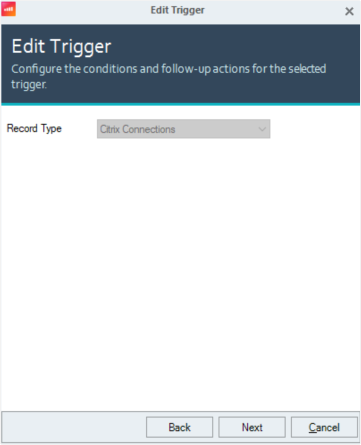
Create an Advanced Trigger with the Record Type Citrix Connections.
-
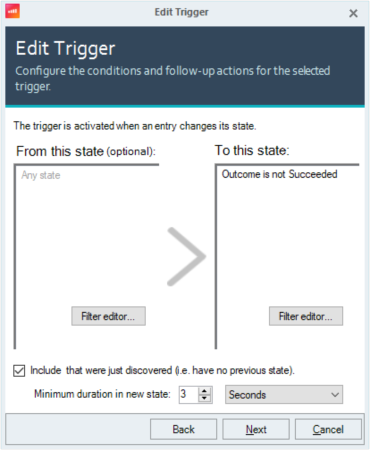
For the To this state condition, set Outcome is not Succeeded. While other values are available, we recommend using the **Outcome is not Succeeded **condition

-
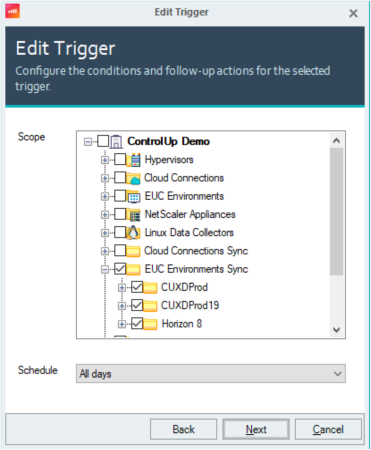
Set the trigger scope by selecting the folders that contain your Citrix VDAs where the ControlUp Agent is installed.
-
Create a new email template by clicking Manage templates. You can choose any template name, but the subject (email header) should clearly indicate that it relates to the connection failure, for example:
Citrix Connection $(ctxconnoutcome): $(ctxconnusername) → $(ctxconnmachinename)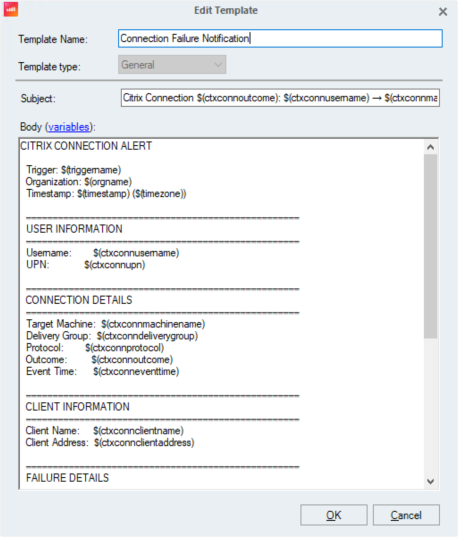
For the template body, you can use the detailed template below. We also provide a compact alternative for shorter notifications
CITRIX CONNECTION ALERT

  Trigger: $(triggername)
  Organization: $(orgname)
  Timestamp: $(timestamp) ($(timezone))

  ═══════════════════════════════════════════════════
  USER INFORMATION
  ═══════════════════════════════════════════════════
  Username:        $(ctxconnusername)
  UPN:             $(ctxconnupn)

  ═══════════════════════════════════════════════════
  CONNECTION DETAILS
  ═══════════════════════════════════════════════════
  Target Machine:  $(ctxconnmachinename)
  Delivery Group:  $(ctxconndeliverygroup)
  Protocol:        $(ctxconnprotocol)
  Outcome:         $(ctxconnoutcome)
  Event Time:      $(ctxconneventtime)

  ═══════════════════════════════════════════════════
  CLIENT INFORMATION
  ═══════════════════════════════════════════════════
  Client Name:     $(ctxconnclientname)
  Client Address:  $(ctxconnclientaddress)

  ═══════════════════════════════════════════════════
  FAILURE DETAILS
  ═══════════════════════════════════════════════════
  Failure Stage:    $(ctxconnfailurestage)
  Failure Category: $(ctxconnfailurecategory)
  Failure Message:  $(ctxconnfailuremessage)

  ---
  Compact Alternative Template

  Subject:
  [$(ctxconnoutcome)] $(ctxconnusername) - $(ctxconnfailurecategory)

  Body:
  Connection attempt $(ctxconnoutcome) for $(ctxconnusername) ($(ctxconnupn))

  Machine: $(ctxconnmachinename) | Delivery Group: $(ctxconndeliverygroup)
  Client: $(ctxconnclientname) ($(ctxconnclientaddress)) | Protocol: $(ctxconnprotocol)

  Failure: $(ctxconnfailurestage) - $(ctxconnfailurecategory)
  Message: $(ctxconnfailuremessage)

  Time: $(ctxconneventtime) UTC
Output Example
When a Citrix connection failure occurs (in this example, any session outcome that is not “Succeeded”), the following email is sent to the recipients configured in the email settings
CITRIX CONNECTION ALERT

Trigger: Citrix Connection Failure
Organization: ControlUp Demo
Timestamp: 2/1/2026 10:43:49 PM (UTC +1 Central European Time)

═══════════════════════════════════════════════════
USER INFORMATION
═══════════════════════════════════════════════════
Username: anthony.green
UPN: anthony.green@controlup-ps.org

═══════════════════════════════════════════════════
CONNECTION DETAILS
═══════════════════════════════════════════════════
Target Machine: CONTROLUP-PS\PSWIN11ADMIN
Delivery Group: PSLAB-JumpBoxes
Protocol: HDX
Outcome: Failed
Event Time: 2/1/2026 8:43:21 PM

═══════════════════════════════════════════════════
CLIENT INFORMATION
═══════════════════════════════════════════════════
Client Name: WR_7lKxntIYdzIQ4jOq_
Client Address: 81.99.xx.xx

═══════════════════════════════════════════════════
FAILURE DETAILS
═══════════════════════════════════════════════════
Failure Stage: Brokering
Failure Category: NoCapacityAvailable
Failure Message: Concurrent session limit exceeded

---
Compact Alternative Template

Subject:
[Failed] anthony.green - NoCapacityAvailable

Body:
Connection attempt Failed for anthony.green (anthony.green@controlup-ps.org)

Machine: CONTROLUP-PS\PSWIN11ADMIN | Delivery Group: PSLAB-JumpBoxes
Client: WR_7lKxntIYdzIQ4jOq_ (81.99.xx.xx) | Protocol: HDX

Failure: Brokering - NoCapacityAvailable
Message: Concurrent session limit exceeded

Time: 2/1/2026 8:43:21 PM UTC