Issue
Some servers display ERR in the CPU, Disk Queue, Avg. Disk Read and Write Time fields..png)
Reason
This issue might happen due to corrupted WMI/performance counters on the target machine.
Solution
Try to run a lodctr /r command on the problematic server and then restart the ControlUp agent.
If that doesn't work, you might need to salvage the WMI repository by opening CMD and running the winmgmt /salvagerepository command. Then restart the server.
To test the ability to retrieve performance data outside of ControlUp, you can use PowerShell commands, for example:
Get-Counter –ComputerName WIN7MED7 -Counter "\Processor(_Total)\% Processor Time"

Get-Counter -Counter "\Processor(_Total)\% Processor Time"
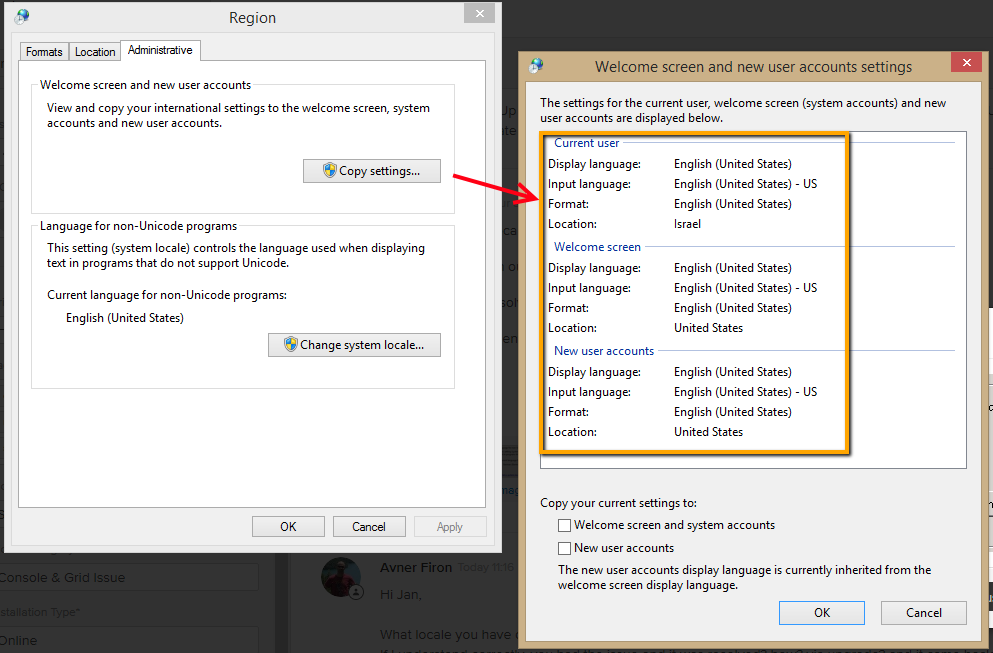
If you still have an issue, check the regional settings of the OS, and see under Copy Settings if all properties are of the same language. If not, ERR will be shown.