ControlUp for VDI can monitor and manage a wide variety of resources/objects in the virtual and/or physical datacenters.
ControlUp continuously counts the total number of objects that are currently being monitored and requires a number of licenses that adequately cover the size of the environment.
Concurrent Licenses
Concurrent licenses are counted as number of daily managed single user workstations + peak number of concurrent RDS/multi-user sessions.
When using concurrent licensing billed through the daily usage feed, the peak RDS/multi-user sessions metric measures the highest concurrent session count observed during a single calendar day.
Daily Evaluation: Captures the maximum volume of simultaneous sessions reached at any point during that 24-hour calendar window.
Calculation Formula: ControlUp determines your total usage for the day using the following logic:
Maximum Daily Usage = Workstations + Daily Session Peak
Reporting: This consolidated number (reflecting the previous calendar day's peak) is compiled and reported to the system the following day.
Named User Licenses
Named user licenses are counted for both Microsoft RDSH/VDI machines and non-RDSH/VDI machines.
Real-Time DX license based on the maximum of either:
ControlUp Real-Time DX historical data (number of workstations + sessions running server machines).
Unmanaged Citrix/Horizon sessions.
If you use the same username/user account in both the Azure VM and Citrix VM, we count this as a single named user.
Agentless unmanaged VMs are NOT counted here.
Agentless Cloud instances are NOT counted here.
General-purpose servers are NOT counted here.
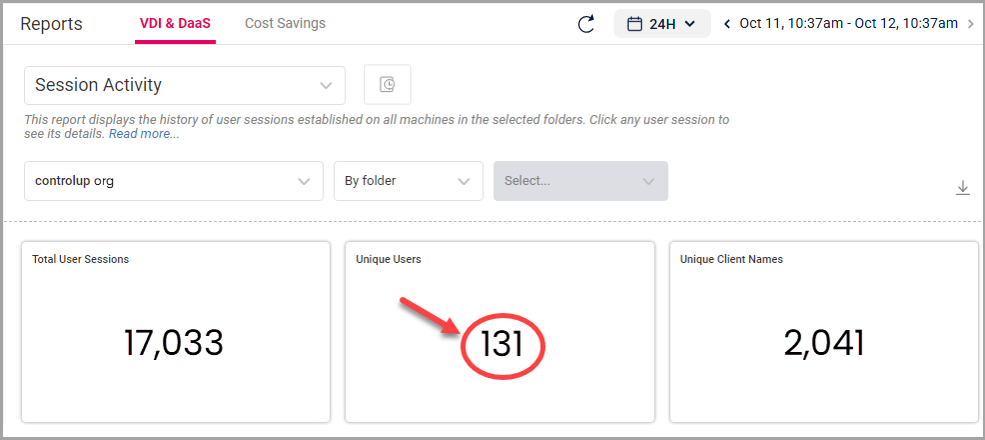
To check your current named user count for licensing, open the web interface, go to Reports > Session Activity, and see the number shown in the Unique Users widget.