Issue
If you use a hyphen in the Hostname and/or DNS Domain field of a URL, for example, SOP-VM, the hyphen will be cut off in the server's real FQDN in Solve On-Premises (SOP) version 8.8.
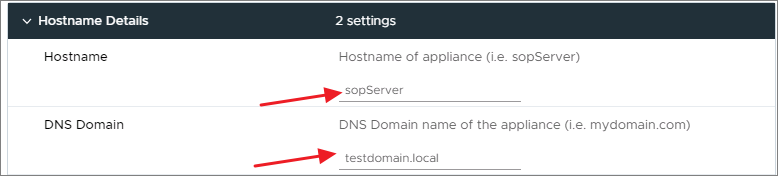
This problem affects all current versions of SOP.
Workaround
-
Secure Shell (SSH) into the SOP machine that has the hostname and/or DNS domain without the hyphen.
-
Run the following two commands to replace the hostname and DNS domain characters:
sudo sed -i '/HOST_NAME=$(SanitizeHostname $USER_HOST_NAME)/c\HOST_NAME=$USER_HOST_NAME' /opt/scripts/setup.sh sudo sed -i '/DNS_DOMAIN=$(SanitizeHostname $USER_DNS_DOMAIN)/c\DNS_DOMAIN=$USER_DNS_DOMAIN' /opt/scripts/setup.sh -
Reboot the machine.
The ovf-env.xml, located under /opt/cdrom, contains Solve environmental variables, such as hostname, DNS domain, and other network information.
-
Run the following command to verify that the hostname and DNS domain are saved with a hyphen.
grep hostname /opt/cdrom/ovf-env.xml
grep domain /opt/cdrom/ovf-env.xml
If the hostname and DNS domain are saved with a hyphen, the following response appears:
Property oe:key="guestinfo.hostname" oe:value="SOP-VM"
Property oe:key="guestinfo.domain" oe:value="my-test-domain.local"
The SOP server runs the configuration and sets the correct hostname and/or DNS domain with the hyphen.