Automatic Reconnection
Automatic reconnection requires a one-time manual configuration. Follow these steps:
- Under the organization tree on the left, select the Show auto-connect state checkbox. The tree should now display a checkbox next to every folder/machine, while an enabled checkbox indicates that this object will be reconnected automatically.
- Check the checkboxes for all Hypervisors/machines which you would like to be monitored automatically. You can also turn this option for entire folders (or the root folder, to affect the entire organization).
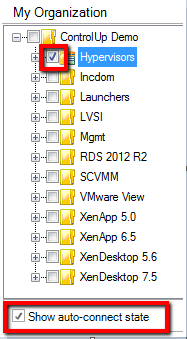
Uncheck the Show auto-connect state checkbox when done. ControlUp will attempt to connect to the selected machines every 5 minutes.
How Do I Enable Auto Connection to My Servers?
Use the auto connect feature if you need the Real-Time DXConsole to reconnect to a server which was, for example, restarted for maintenance.
Click Show auto-connect state to choose which servers or folders to connect to automatically.
Once you are done with marking servers/folders, decide how much time will pass until the console will try to reconnect.
The option presented in the screenshot can be found under Settings -> Agent Settings.