Beta
This feature is in beta. Contact your ControlUp representative for more information.
Use Enrich to view ControlUp for VDI machine and session data, and run actions, directly from the web apps you already work in. Enrich now detects VDI machines and sessions alongside physical devices, distinguishing between the two, surfacing real-time data for each, and showing the remediation actions available to you based on your permissions - all without leaving your current browser tab.
Use this guide to install Enrich for VDI. To learn more about Enrich and its features, see Enrich Browser Extension.
Benefits
Faster troubleshooting: see real-time VDI session/machine data without pivoting between tools.
Less context-switching: investigate and act on VDI issues directly from the SaaS application you're already working in (e.g., ServiceNow, Intune).
Reduced support overhead: relevant events and permission-aware actions are surfaced automatically, so you spend less time digging for context.
Before you begin
Enrich supports Microsoft Edge and Google Chrome only.
ControlUp for VDI must be enabled for your organization.
The VDI actions you can run depend on your Real-Time DX Console security policies.
Install Enrich for VDI
Enrich for VDI is currently in beta, and you must use the beta version of the extension:
Disable any current version of Enrich extension on your browser.
Install the ControlUp Enrich - Beta extension from the Microsoft Edge Add-ons store or the Chrome Web Store.
VDI Machine and Session Support
If ControlUp for VDI is enabled for your organization, Enrich now detects VDI machines and VDI sessions on supported websites, as well as physical devices. You can view a VDI machine’s or session’s details and take action on it without leaving the page.
Search for VDI Machines and Sessions
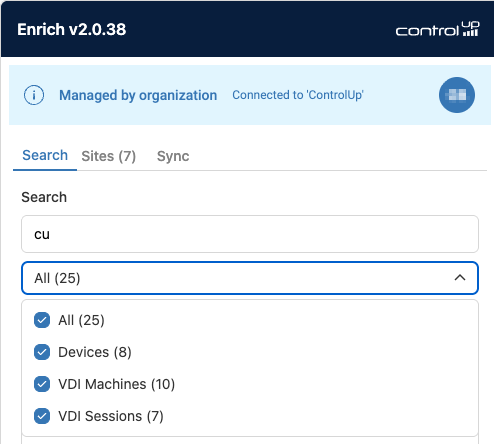
The Search tab in the Enrich extension now returns VDI machines and VDI sessions along with devices. You can search sessions by username or machine name, and results show the current machine status or session state. Select a machine from the results to open the overlay and view the performance widgets for that VDI machine and session.
VDI machines and VDI sessions
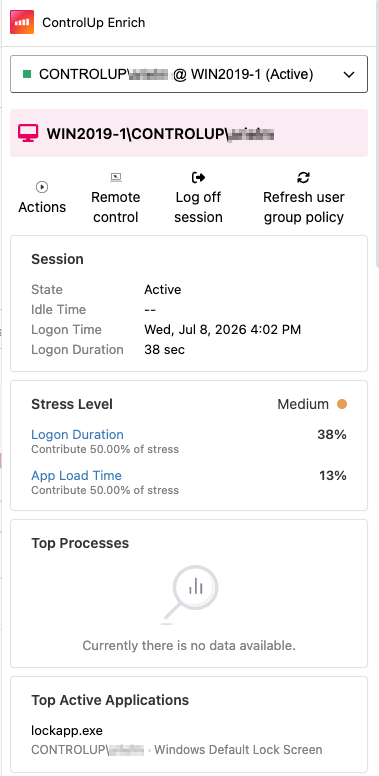
Enrich treats VDI machines and VDI sessions as separate objects, and shows different data and actions for each. The overlay shows performance widgets for the selected VDI machine or session.
Object | What it is | Shown in results |
|---|---|---|
VDI machine | A virtual machine in your VDI environment | Current machine status |
VDI session | A user’s session on a VDI machine | Current session state |
Overlay details for a VDI session:
Run VDI Actions
You can run ControlUp actions on VDI machines and sessions directly from the overlay. Each action appears only if it applies to the selected machine or session, and only if your role allows it.
Sync Tab
The Sync tab shows how many VDI machines and sessions were synced, alongside the device count. Click Sync now to get the latest devices and settings.
Troubleshooting
Issue | Likely cause | What to check |
|---|---|---|
No activation on target site | Site not configured or disabled | Review Enrich site settings in the tenant. |
Enrich doesn’t detect a VDI machine or session | Detection identifiers do not match page content | Check configured selectors, identifiers, or searchable values on the page. |
Enrich overlay opens but data is missing | Backend, API, or permission issue | Check the tenant configuration, backend reachability, and RBAC. |
Actions are missing | User lacks permission or feature is not applicable for VDI | Validate Real-Time DX Console security policies and available API integrations. |