By default, the ControlUp Agent collects data about all processes on your managed Windows machines. This can be resource-intensive and unnecessary, so you can use the Process Data Collection settings to restrict which processes are collected.
Note
This feature applies only to Windows processes. It doesn't apply to Linux processes.
Enable process collection restrictions
In the Real-Time DX Console, go to Settings > Process Data Collection and select the checkbox Restrict data collection to processes in the Inclusion List and user-attached processes.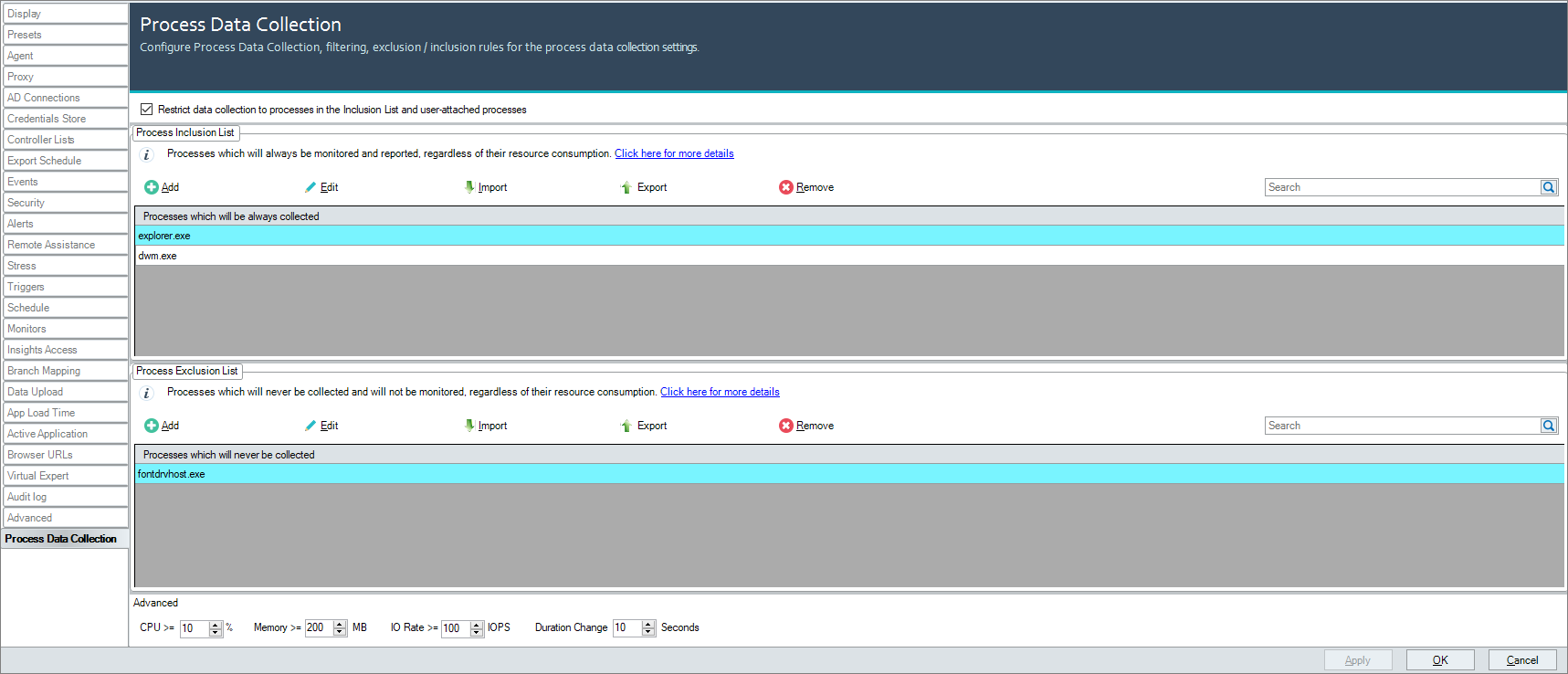
By selecting the checkbox, ControlUp Agents no longer collects system processes (processes that run under SessionID = 0) unless:
The process's resource consumption meets the following criteria:
Avg. CPU >= 1% OR
Avg. Working Set >= 100 MB OR
Avg. IOPS >= 10 IOPS.
The process is on the following list (these are always collected regardless of their resource consumption):
amagent
AppLoadTimeTracer
appvclient
amazon-ssm-agent
atmgr
brokeragent
brokerservice
ControlUpConsole
CSFalconService.exe (collected by default from version 9.2 only)
cuAgent
cuAgentHelper
cuMonitor
dwm
Ec2Config
emuser
frxsvc
g2mstart
imasrv
isxagent
lsiagent
nxtcoordinator
picasvc2
pmagent
pvsvmagent
rdagentbootloader
rpmagent
svservice
teams
vmwAgent
v4pa_agent
VUEMUIAgent
WindowsAzureGuestAgent
wsnm
zoom
All user processes are still collected. By selecting the checkbox, you can expect around a 50%-70% process reduction, which can improve Monitor scalability and web interface performance.
If you need more control over which processes are collected, you can use the inclusion/exclusion list or adjust the thresholds.
Process Inclusion and Exclusion Lists
If you want to collect additional system processes, add them to the Process Inclusion List. Processes on this list are always collected, regardless of their resource consumption. You might want to add processes related to antivirus and EDR software listed below.
If you don't want to collect certain system or user processes, add them to the Process Exclusion List. Processes on this list are never collected, regardless of their resource consumption. You can use the exclusion list to override the system processes listed above that are always collected regardless of resource consumption (if you add one of those processes to the exclusion list, it is not collected).
When adding processes to the inclusion or exclusion list, note that process names:
are case-insensitive. For example, "cscript.exe" and "CSCRIPT.EXE" are equivalent.
don't require extensions. For example, "cscript" and "cscript.exe" are equivalent. As best practice, we recommend that you use the full process name.
If you add a process to both the inclusion and exclusion list, it is not collected.
Adjust threshold filters (advanced)
Any system process that is not on the inclusion or exclusion list (or is not on the default list of processes that are always collected) is collected only if it's resource consumption meets the any of the criteria specified in the Advanced section for the duration set in the Duration Change field. If a system process doesn't match any of the criteria, it isn't collected.
The following table shows which metrics are used to compare against the criteria:
Threshold Metric | Real-Time Metric | Field in Process Table (Monitor In-RAM DB) |
|---|---|---|
CPU | CPU | CPU_Usage |
Memory | Memory (Working Set) | WorkingSetSize |
IO Rate | I/O Operations/sec | IOOperationsPerSec |
Note that the minimum values for all thresholds is 1. For example, you can't set CPU >= 0% as the UI will not allow you to save this setting.
Zero Values
If a process uses 0% CPU or 0 IOPS, then the filter will be ignored. As best practice, don't use such low threshold values for filtering processes.
For example, let's consider the MsMpEng.exe process (Microsoft Windows Defender) that runs under the NT AUTHORITY\SYSTEM user. This process is a system process that automatically qualifies for threshold settings. On our two managed machines, the process consumes 0% CPU, 144/169 MB memory, and 0 IOPS:
Change the memory threshold to 200 MB, the CPU value to "1", and the IOPS value to "10". Remember that "0" values are ignored in the filter criteria.
In the real-time view, you can now see that the process isn't displayed anymore, as the memory filter criteria isn't met (144 and 169 MB is less than 200 MB).
Enable/disable process data collection per agent
You can also enable or disable the Process Data Collection feature per agent by using the following registry settings:
Registry Key: HKLM\SOFTWARE\Policies\Smart-X\ControlUp\Agent
Value: ProcessReduction
Data Type: REG_DWORD
Value Data: 0 (Disabled), 1 (Enabled)
Note that the settings you configure in the Real-Time DX Console take precedence over the registry settings you configure (above). This means that you can only use the registry settings to disable Process Data Collection on an agent if it is enabled in the console. If Process Data Collection is disabled in the console, the registry settings you configure have no effect.
After Configuration
You aren't required to restart agent machines after you change your Process Data Collection configuration.
Process data collection in the VDI App
If you use our VDI App, you can view the aggregated number of processes that you specifically select to monitor in the Monitored Processes column in the grid of the Machines view in the topology.
VDI reports with charts that list the names of the top resource consumers, such as Machine Trends, only display data collected from monitored processes that match all threshold criteria.
Antivirus and EDR processes to add to the inclusion list
If you use antivirus and EDR products, we recommend to add the following antivirus and EDR processes to the Inclusion List:
about.exe
agentcontroller.exe
analysecrash.exe
AutoExcl.exe
bdagent.exe
bdfvcl.exe
bdfvwiz.exe
bditxag.exe
bdload.exe
bdntwrk.exe
bdreinit.exe
bdservicehost.exe
bdsubwiz.exe
bdtbnmh.exe
bdtkexec.exe
bdtpwiz.exe
bdtrackersnmh.exe
bdwinre.exe
bdwtxag.exe
bdwtxcon.exe
bdwtxcr.exe
bdwtxffimp.exe
bdwtxieimp.exe
bitdefenderci.exe
ccSvcHst.exe
certutil.exe
ClientRemote.exe
clwinre.exe
cscomutils.exe
csdevicecontrolsupporttool.exe
CSFalconcontainer.exe
CSFalconcontroller.exe
CSFalconService.exe (collected by default from version 9.2 only)
csfirmwareanalysissupporttool.exe
csscan.exe
csscancli.exe
cssensorsettings.exe
cyserver.exe
cyveraconsole.exe
cyveraservice.exe
dbisqlc.exe
dbsrv16.exe
DefendpointService.exe
DevViewer.exe
DoScan.exe
downloader.exe
dsagent.exe
DWHWizrd.exe
elastic-agent.exe
Executable
fcappdb.exe
fcaptmon.exe
FCDBLog.exe
FCHelper64.exe
FCVbltScan.exe
ffutils.exe
fmon.exe
fortiae.exe
FortiAvatar.exe
FortiClient_Diagnostic_Tool.exe
FortiClient.exe
FortiESNAC.exe
fortifws.exe
FortiProxy.exe
FortiScand.exe
FortiSettings.exe
FortiSSLVPNdaemon.exe
FortiTray.exe
FortiUSBmon.exe
FortiWF.exe
genptch.exe
hntwhlpr.exe
httpd.exe
inproductbilling.exe
installer.exe
ipsec.exe
LuCallbackProxy.exe
LuCatalog.exe
LuComServer_3_3.exe
macmnsvc.exe
macompatsvc.exe
masvc.exe
MCCHHOST.exe
MCSHIELD.exe
MCTRAY.exe
mfeatp.exe
MFECANARY.exe
MFECONSOLE.exe
MFEDSP.exe
MFEENSPPL.exe
MFEESP.exe
mfefire.exe
MFEFW.exe
MFEHCS.exe
MFEMACTL.exe
mfemms.exe
MFETP.exe
mfevtps.exe
MFEWC.exe
MigrateUserScans.exe
mitm_install_tool_dci.exe
msmpeng.exe
mssense.exe
nativeauth.exe
nlnhook.exe
ntrtscan.exe
obk.exe
obkagent.exe
obkch.exe
odscanlogviewie.exe
odscanui.exe
odslv.exe
odsw.exe
onboarding.exe
productagentservice.exe
productagentui.exe
productcfg.exe
qualysagent.exe
QualysAgentUI.exe
QualysCloudAgent.exe
ransomwarerecover.exe
RepMgr64.exe
RepUtils32.exe
RepUx.exe
RepWSC64.exe
RtvStart.exe
SavUI.exe
scanhost.exe
scheduler.exe
seccenter.exe
semapisrv.exe
SemLaunchSvc.exe
semsvc.exe
sensecm.exe
sensegpparser.exe
senseir.exe
sensendr.exe
sensesampleuploader.exe
sensetvm.exe
sentinelagentworker.exe
sentinelservicehost.exe
sentinelstaticengine.exe
sentinelstaticenginescanner.exe
SepLiveUpdate.exe
sesmcontinst.exe
Smc.exe
SmcGui.exe
snac64.exe
sophososquery.exe
sophososqueryextension.exe
sophossafestore64.exe
sophosupdate.exe
st_launcher.exe
supporttool.exe
SymCorpUI.exe
symerr.exe
taniumclient.exe
Taniumcs.exe
taniumdetectengine.exe
taniumdriversvc.exe
taniumtsdb.exe
testinitsigs.exe
tlaworker.exe
TMBMSRV.exe
TmCCSF.exe
tmlisten.exe
TmPfw.exe
TmProxy.exe
tpython.exe
UPDATERUI.exe
updatesrv.exe
updcenter.exe
updcenter.exe
vulnerability.scan.exe
wsccommunicator_ls.exe
wsccommunicator.exe
wscfix.exe