Custom Hives let you run Scouts from infrastructure that you manage, including custom network locations and internal resources that Cloud Hives cannot access.
This article explains how Custom Hives work, why you might use them, and their network requirements.
For installation instructions, see:
What is a Custom Hive?
A Custom Hive is a Synthetic Monitoring component installed on a Windows or Linux host in infrastructure that you manage. It connects to your Synthetic Monitoring organization and runs the Scouts that you create and manage in the Synthetic Monitoring web app.
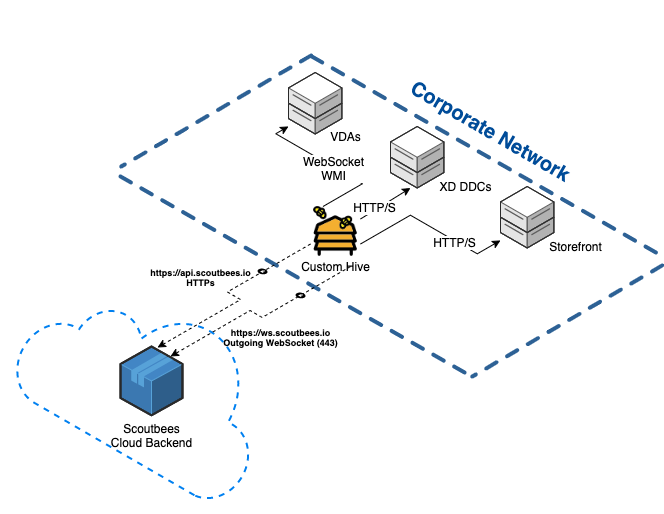
The Custom Hive sends Scout results to the cloud-based Synthetic Monitoring backend for monitoring and alerting.
The Custom Hive establishes an outbound secure WebSocket connection to the Synthetic Monitoring backend.
Configuration data and Scout credentials are encrypted and stored on the host where the Custom Hive is installed.
Custom Hives can be installed and upgraded without user interaction. For more information, see Silent Install for Custom Hives and Upgrade Custom Hives.
Motivations for Using a Custom Hive
Cloud Hives can face the following challenges when accessing and testing resources:
- 2FA. Increasingly, various methods of 2FA, such as one-time PIN codes, SMS-based tokens, and mobile push notifications, are implemented on publicly accessible gateways. These security measures make automated synthetic logins difficult.
- Internal networks and services. Enterprise networks are complex, consisting of various local and wide-area networks, branches, and internal applications and services. Testing published resources only from outside the internal network might not provide sufficient information about the entire business application status.
- Additional data. Collecting data about a resource's status and connection phases from an external source is useful, but you might need to correlate it with additional data from backend components to monitor your business application more closely.
These challenges can be addressed by using a Custom Hive, which allows you to:
- Initiate and run Scouts from internal or custom network locations to test resources that Cloud Hives cannot access.
- Collect session data from on-premises Citrix Delivery Controllers.
- Save Scout credentials on-premises.
For example, with a Custom Hive, you can enrich synthetic session data with the following information:
Server Name: VDA01 | Session ID: 123 | Logon Duration: 15.501s | ICA RTT: 2ms | Network Latency: 0ms | Logon Scripts Duration: 4s | Profile Load Duration: 47ms | GPO Duration: 1.7s | Authentication Duration: 40ms

Brokered by: ddc01 | Brokering Duration: 70ms | Hosting server: VDA01 | Desktop Group: Windows Server 2022 Prod Delivery Group | Catalog Name: Windows Server 2022 Prod Catalog | Pending Update: False
Organize and Control Access to Custom Hives with Tags
You can assign tags to Custom Hives to organize and filter them, and to control access through custom roles. Tag-based permissions control which Custom Hives users can view, update, delete, or assign to Scouts.
You can add tags when creating a Custom Hive. For more information, see Centralized Tags Management.
Network Connections and Prerequisites
The required connections depend on the platform and Scout types that run from the Custom Hive.
| Origin | Destination | Protocol | Purpose |
|---|---|---|---|
| Custom Hive | http://ws.scoutbees.io or https://ws.eu.scoutbees.io for the EU region | WS over HTTPS | Create a secure WebSocket connection between the Custom Hive and the Synthetic Monitoring cloud-based backend |
| Custom Hive | https://api.scoutbees.io or https://api.eu.scoutbees.io for the EU region | HTTPS | Send test results to the Synthetic Monitoring metrics database |
| Custom Hive | StoreFront or NetScaler Gateway | HTTP/S | Retrieve published resources and open a session |
| Custom Hive | VDAs | WebSocket, using port 8008 by default | Open a WebSocket-encapsulated HDX session to the relevant VDA. This connection is required only for internal StoreFront Scouts. |
| Custom Hive | Citrix Delivery Controllers | HTTP/S | Retrieve session and machine metrics and metadata about the tested published resource. This connection is required only for internal Citrix StoreFront Scouts. |
| Custom Hive | Omnissa Horizon Connection Server | HTTPS | Connect to the Omnissa Horizon HTML client |
| Custom Hive | VMware Unified Access Gateway | HTTPS | Connect to the Horizon HTML client |
CPU and RAM Usage
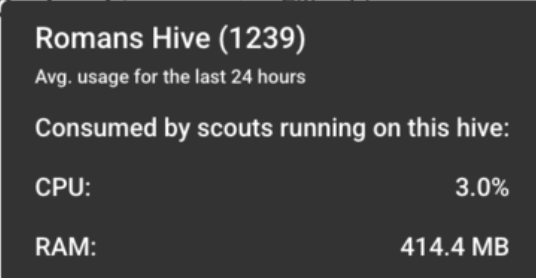
You can view the CPU and RAM consumed by Scouts running from a Custom Hive.
In the Hives tab, hover over a Custom Hive to display its resource usage.
Prerequisite for Citrix StoreFront Scouts
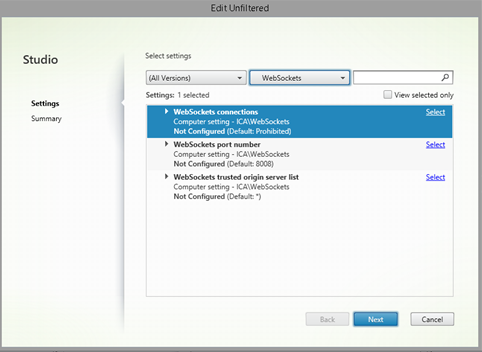
You must allow WebSocket-based sessions on the relevant delivery groups in the Citrix Virtual Desktops policy so that the Scout runner can connect to the published resources.
-
Go to the Group Policy Management Console or Citrix Studio to configure HDX policies.
-
Select the WebSockets connections policy setting and allow WebSocket connections.
-
Enable the policy and assign it to the relevant Delivery Groups.