License required
Workflows requires ControlUp for Desktops Advanced, ControlUp for VDI Advanced, or ControlUp ONE. All licenses must be on an Advanced tier or ControlUp ONE to access Workflows. Visit the Pricing page for details.
ControlUp Workflows is an automation app designed for IT teams to streamline operational tasks. It provides a visual, low-code interface for creating, managing, and monitoring automated workflows that integrate with various IT systems. In addition to manual and scheduled automations, ControlUp Workflows also offers event and content-activated run options.
Workflows enables you to build sequences of actions (flows) using a drag-and-drop canvas. These flows are composed of interconnected nodes, where each node represents a specific action or logic control. ControlUp Workflows supports a wide range of integrations with third-party applications and services, allowing workflows to interact with different systems. Integrations power flows to act based on application, endpoint, and DEX platform inputs. For more details about integrations, see here.
You can also use Flow Control nodes that provide conditional logic and looping within workflows. String Manipulations nodes facilitate the processing and transformation of text data.
Workflows also provides pre-designed flow templates to help you start building automations. For more details about our templates, see here.
Access Workflows
In the DEX platform, click the Workflows icon on the left side menu of available apps:

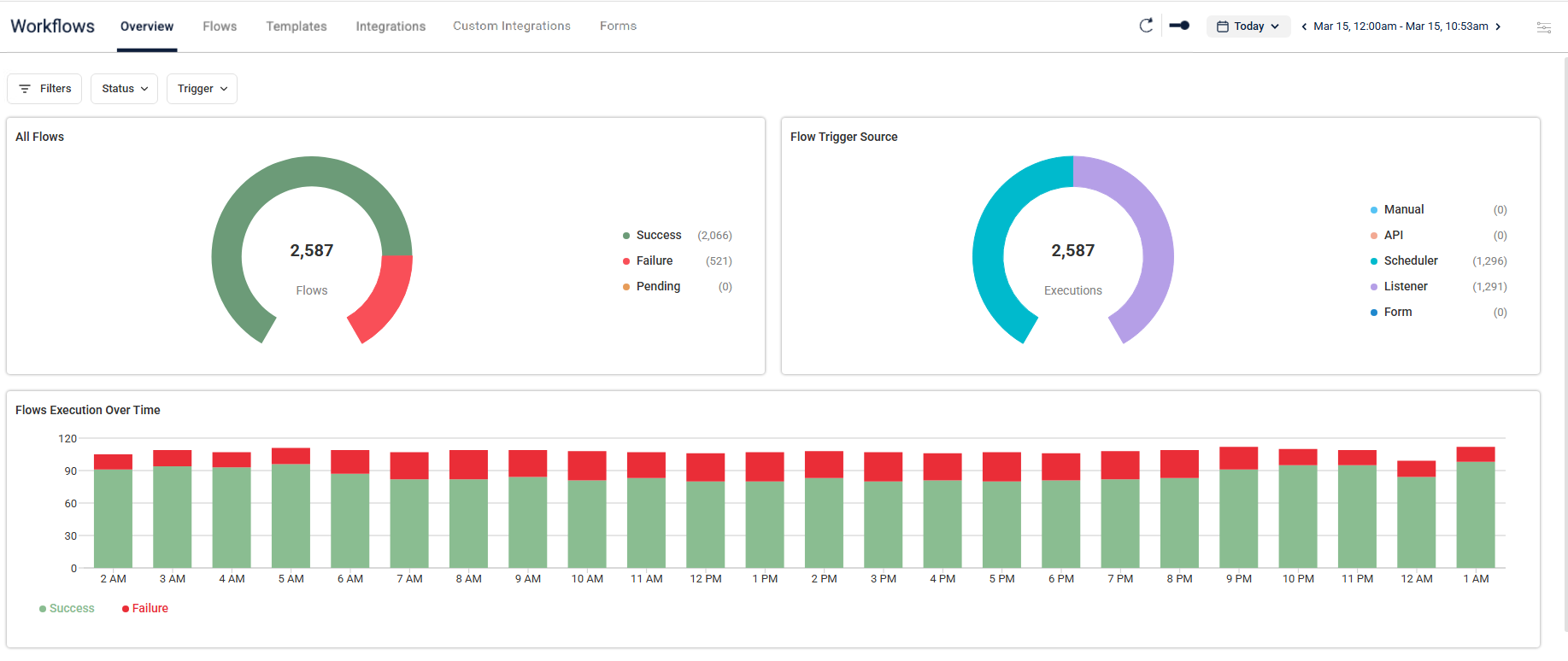
Workflows opens to an Overview page that helps you track, manage, and understand the performance of your flows and automated processes. You can see which flows are running, completed, or need attention.
The Overview page also includes a Flow Executions table that shows recent flow runs, including status, start time, run time, and run history.
You can open the AI Summary to review execution reliability, trigger patterns, and runtime performance for the selected time range:
You can also use the platform filters to better target the flow information you want to see.
To display specific flow items, click the Filters button on the top left of each Workflows page and select conditions as needed. Each Workflows page has default filters. For example, the Overview page default filters are Status and Trigger.
Key Features
Here are the key features to create flows and use the Workflows app.
Visual Workflow builder
Create complex automation workflows using an intuitive drag-and-drop interface. The visual builder enables you to design, test, and implement workflows.
Flexible options to initiate flows
You have the option to initiate Workflows by selecting:
Schedule: Workflows can be configured to run automatically at predefined times and intervals.
API: External systems can trigger workflows via a dedicated API endpoint.
Manual: Users can trigger the workflow directly through the application interface.
Listener: External alerts or events from supported integrations can trigger the workflow.
Form: Users submit forms to automatically run workflows based on the provided form input.
Rich Integration ecosystem
You can seamlessly connect with various enterprise IT tools and services to create comprehensive automation solutions. These include many out-of-the-box options like:
Microsoft applications
ITSM and CRMs, such as ServiceNow
Cloud environments, such as Google Workspace and Windows 365
Virtual desktop infrastructures, such as Citrix and Microsoft Azure VM
Automatic background connectivity with other ControlUp products, providing secure access to exclusive internal platform capabilities while respecting existing user permissions.
You can use workflows to take actions based on application, endpoint, and DEX platform insights.
Workflow status
You can track the status of the flows you create, view run history, and review execution details. You can also use built-in version control to move between versions of your flows.
Common use cases
You can create flows for different use cases in your business. Here are a few examples that we can support.
Employee Onboarding
You can streamline the process of integrating new employees into your organization. Here are a few examples of tasks that can be automated in a flow.
Automate device provisioning through Microsoft Intune.
Set up user accounts across multiple systems.
Configure access permissions and security policies.
Streamline workspace and collaboration tool setup.
Employee Departures
You can create flows to ensure secure and efficient departure procedures.
Trigger manually or via an external system, for example an HR platform.
Automatically deactivate all relevant accounts like Microsoft Entra ID and Google Workspace.
Manage devices and security enforcement.
Revoke access across integrated systems.
Document and report compliance, for example add a record of the offboarding actions to a log.
Send a farewell email containing necessary information to a personal email address.
IT System Remediation
IT admins can ensure that system health and security are maintained throughout the organization with these flows.
Create automated incident response.
Monitor your system health and create recovery flows.
Investigate security alerts and set up resolution flows.
Remediate compliance violations.
General IT Process Automation
You can optimize how your team performs routine IT operations by automating them with these flows.
Automate regular system maintenance tasks.
Create flows for backup and recovery procedures.
Enforce security policies.
Synchronize data across platforms.