ControlUp for Desktops
Script metadata - When viewing your scripts, you can now see:
Who created the script
When the script was created
Who last modified the script
When the script was last modified
.png)
View 1000 call participants - You can now view up to 1000 participants in a single Microsoft Teams or Zoom call.
Enrich browser extension version 2.0.9 released:
Fixed an issue causing the Remote Shell action to fail. Remote Shell is now working.
Improved device detection methods when using ServiceNow.
Windows Agent version 2.17.3 (released July 13 - 2.17.3.6256)
Fixed an issue where process details weren't collected on certain application crashes. This was causing inconsistencies between various application crash reports.
Known issue: During an application crash, the application's state (foreground, background, or windowed) is not recorded correctly. This is a new feature introduced in version 2.17, and other application crash data is unaffected.
IGEL Agent version 2.17.2 (released July 22)
This Agent version is released only for IGEL OS 12 and is available on IGEL UMS.
Added support for ControlUp for Apps
Known issue: ControlUp for Apps doesn't work on devices using wireless connections.
Known issue: ControlUp for Apps doesn't capture screenshots for hard errors.
Known issue: WiFi SSID is not recorded.
Known issue: Agent doesn't report when the device is in a locked state.
ControlUp for Compliance
Enhanced control over application closures and device reboots during patching - Patching configurations for Templates and Jobs now include options to enable or disable automatic application closures. You can configure the behavior to force close the application after displaying a notification to the user, or you can allow the user to snooze the notification and postpone the application closure. Additionally, we've updated the automatic device reboot settings to give your end users more control when they snooze and postpone the reboot.
These changes require ControlUp for Compliance Agent version 1.3.2507.15 or higher. Legacy device restart settings remain active for devices running version 1.3.2505 or lower. In your existing Templates, the new settings have been automatically configured to match current behavior. We recommend that you review the new settings..png)
Microsoft Intune remediation integration beta - The new integration lets you use ControlUp for Compliance to discover application vulnerabilities and then use their existing Intune workflow to deploy the required patches. Additionally, you can use your existing Entra ID groups and tags to target devices for scanning and remediation.
ControlUp for Apps
Monitor browser home pages - You can now use ControlUp for Apps to monitor applications that are configured as the browser's home page.
Disable screenshot capture - We've added a new setting that lets you disable screenshot captures when a user encounters a hard error. This gives you more control over data privacy. Learn more.
ControlUp for VDI
See details in the Latest VDI Version release notes.
For previous versions, see ControlUp for VDI (Real-Time DX versions).
For July updates to the VDI REST APIs, read the API changelog.
Remote Clients Plugin version 2.4.2506.6 (macOS)
New Features
We added the following new collected client device metrics:
Client Latitude
Client Longitude
Latency Target
Improved non-routable IP address detection.
Support for JSON-RPC protocol for data transfer between plugins and server-side resources.
Fixes
195649: MacOS plugin deploys successfully.
237690: The ISP name displays correctly in the data grid.
241791: All WiFi metrics display correctly.
All gateway collecting metrics display correctly.
Updated distribution package: Replaced “DISTRIBUTION_TITLE” with a readable plugin name.
VMWare and Citrix distribution package: Added product ID and version to description.
Synthetic Monitoring
Custom Hive 1233
Silent install advanced arguments - We have added the ability to control custom hive configuration with greater precision using advanced arguments, extending beyond just the hive key.
VMware Security Server - Fixed an issue in EUC scouts that caused authentication failure.
Citrix Workspace app - Fixed an issue that caused a crash in some cases.
Workflows
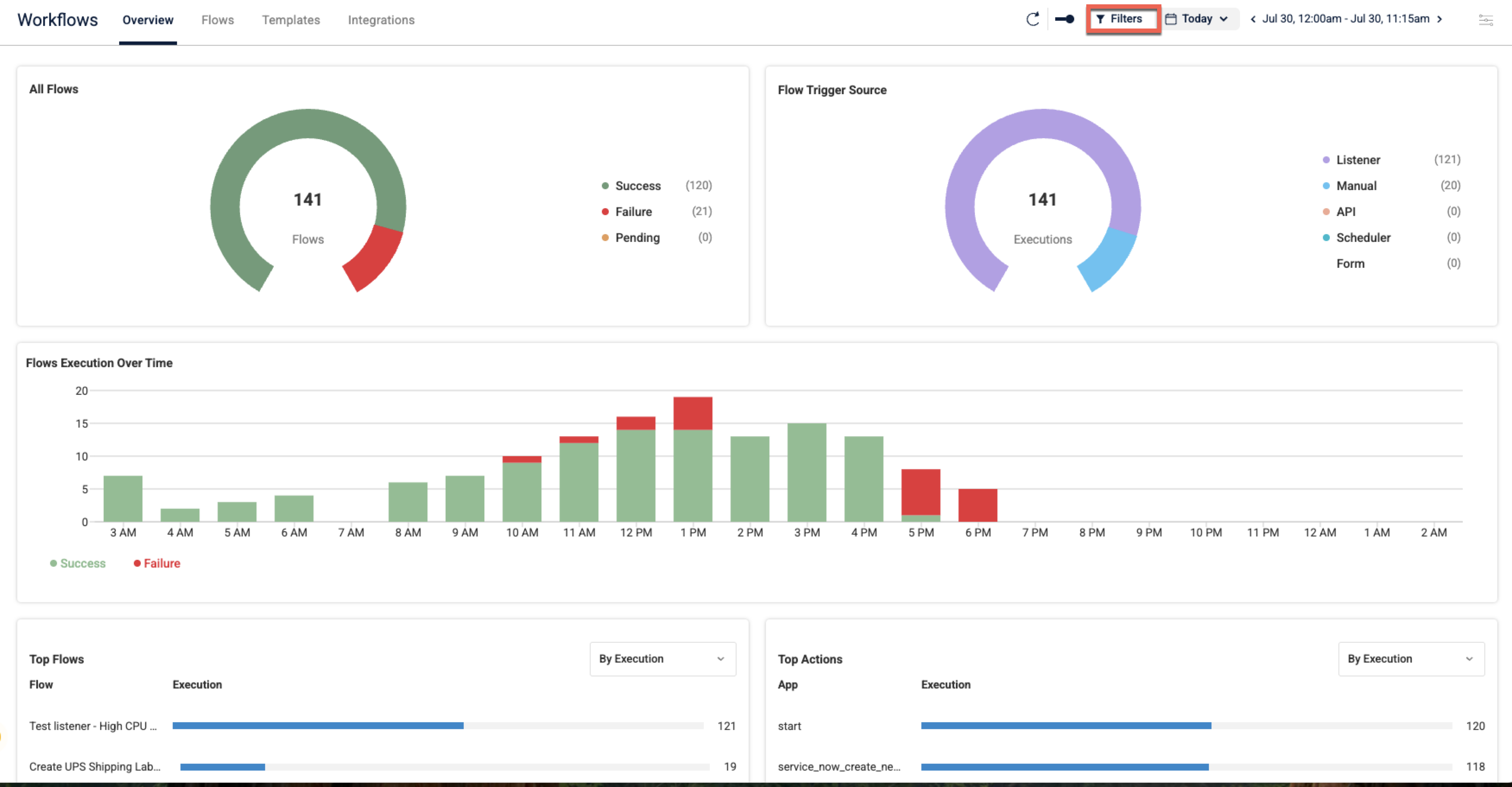
New overview page - Provides you with the ability to track, manage, and understand the performance of your automated flow processes. Includes additional filtering options to quickly find the information you need.
Notes feature - You can now add descriptive notes directly into your individual flows to improve collaboration and maintain clarity across the nodes of your flows. Include important context, explanations, or reminders within the flow itself, making it easier for you and your team to understand the purpose, logic, or any specific considerations for each flow.
Okta integration - You can now automate a wide range of user and group management tasks directly within your flows. Streamline your identity lifecycle management, improve security, and enhance operational efficiency by automating Okta-related actions from onboarding to access provisioning.
Switch-case node - You can now use more sophisticated and efficient conditional logic within your flows. This node enables your flows to evaluate a single input against multiple predefined cases, executing a specific branch of actions for the first matching case. This streamlines the design of complex automations, reduces the need for nested 'If' conditions, and makes your workflows more readable and maintainable when handling various scenarios.
Audit logs - You now have comprehensive visibility into all activities and changes within Workflows. Track who did what, when, and where, offering a complete record of actions such as workflow creation, modifications, deletions, and execution attempts. Audit logs are essential for ensuring compliance, enhancing security, and troubleshooting any changes with full accountability.
Retry configuration - This new option enhances the resilience of your workflows. You can now configure steps to automatically reattempt execution upon temporary failures, greatly improving reliability and reducing the need for manual intervention.