This article covers the communication requirements for deploying ControlUp for VDI versions 9.0 and higher in the US + rest of the world (non-EU) region. Visit these articles to see the communication requirements for:
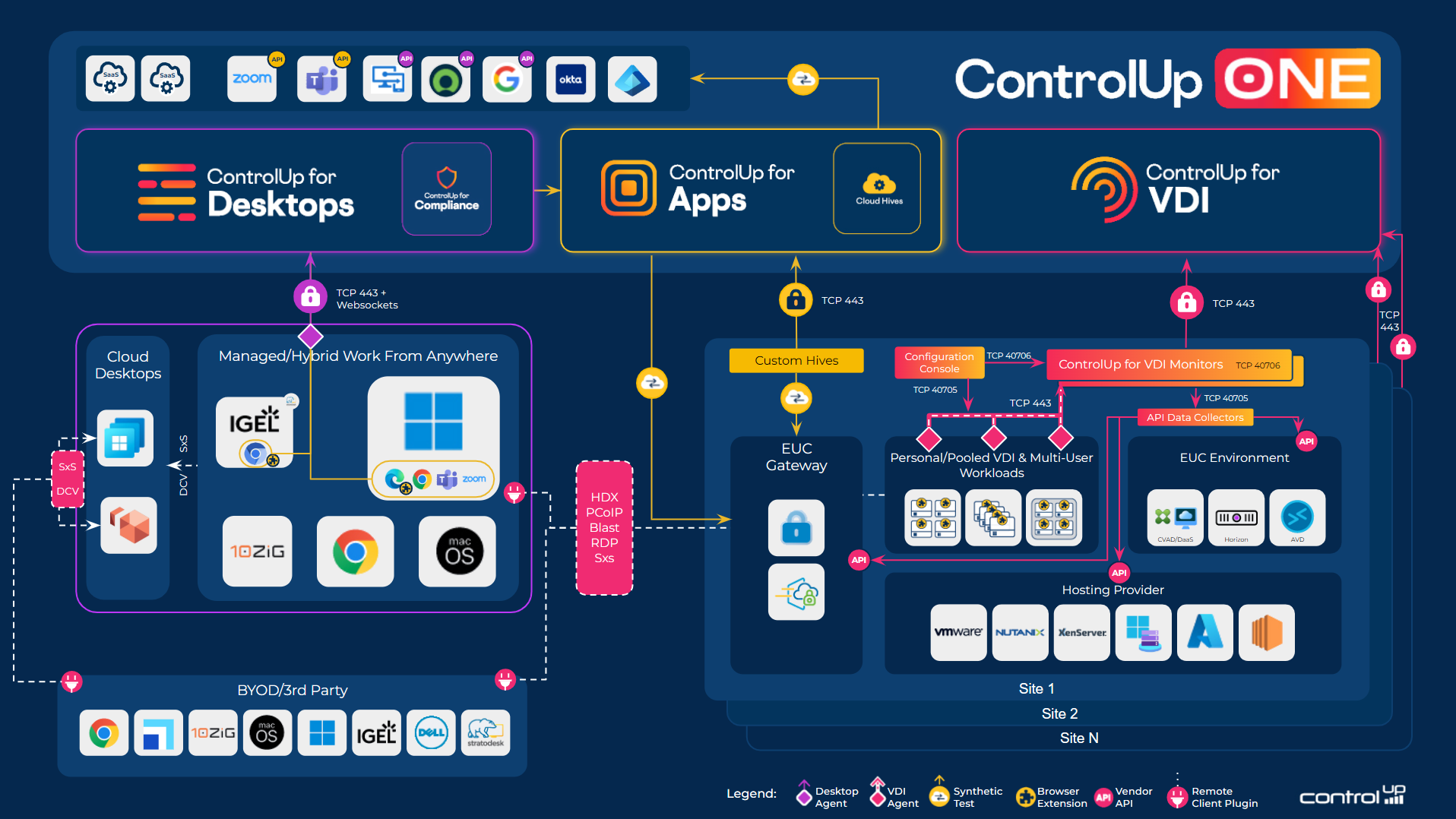
Network testing tool
You can use our network connection testing tool to make sure you have all the network communication requirements in place.
9.0 Specific URLs
All 9.0 and higher specific URLs below need to be accessed via port 443. All these services are running via REST.
9.0 Monitors
9.0 and higher monitors initially attempt to connect to cu-services-cpa.controlup.com. Depending on their geolocation, they will then attempt to connect to a region-specific URL (either -us or -eu). If your organization operates monitors in different geographical regions, we highly recommend to allowlist all URLs as listed below to avoid communication issues.
Outbound Data Connections
The following table includes all the communication ports that you need for ControlUp to work properly. To use our integrations, you must allowlist mandatory ports and URLs, as well as mandatory outbound URLs.
When you use a proxy in your environment, you must allowlist and open the ControlUp cloud configuration servers through your proxy.
Network Tester Tool
To verify connectivity from ControlUp products and components, you can use our network tester tool which checks connectivity to all required outbound URLs.
Web Application Firewall
ControlUp ensures that all URLs are protected using TLS to safeguard data during transit. However, for certain URLs, you must also enable SOAP. You can find this information in the Purpose column for the relevant URLs.
From the Real-Time Agent Machine**
For the optional Agent Outbound Communication feature, ensure you allowlist the following URLs. Similarly, we recommend to allowlist all URLs if your ControlUp Agent machines operate across various geographical locations.
Source | Destination | Type | Port | Protocol | Purpose |
|---|---|---|---|---|---|
Required agent outbound URLs to use Agent Outbound Communication | |||||
ControlUp Agent | ControlUp Monitor | TCP | 443 | HTTPS | Agent to Monitor communication |
ControlUp Agent | cu-agents-cpa.controlup.com/broker-discovery | TCP | 443 | HTTPS | Broker Discovery service for agent outbound communication |
ControlUp Agent | cu-agents-cpa.controlup.com/outbound-security | TCP | 443 | HTTPS | Outbound security service for agent outbound communication |
ControlUp Agent | cu-agents-cpa-us.controlup.com/broker-discovery | TCP | 443 | HTTPS | Broker Discovery service for agent outbound communication |
ControlUp Agent | cu-agents-cpa-us.controlup.com/outbound-security | TCP | 443 | HTTPS | Outbound security service for agent outbound communication |
** These URLs are only relevant to use Agent Outbound Communication in ControlUp versions 9.0 and higher
Optional port, to use Remote Control in the VDI App
Source | Destination | Type | Port | Protocol | Purpose |
|---|---|---|---|---|---|
ControlUp Agent | solve-ws-proxy-us.controlup.com | TCP | 443 | HTTPS / WSS | Remote Control session from the VDI App |
SSL Inspection
It is possible that outbound communication from the Real-Time agent machines to our services may be disrupted by SSL inspection technology. In this case, it is recommended that the address spaces or IPs are added to internal bypass lists to allow for this communication to succeed.
From the machine used to access the DEX Platform VDI App
To manage your VDI environment from the VDI App, your machine must have access to:
Source | Destination | Type | Port | Protocol | Purpose |
|---|---|---|---|---|---|
Any computer | app.controlup.com | TCP | 443 | HTTPS | DEX platform |
Any computer | https://prod-dex-login.controlup.com | TCP | 443 | HTTPS | Web login |
Any computer | https://prod-dex-login-eastus.controlup.com | TCP | 443 | HTTPS | Required only for SAML SSO |
Any computer | https://solve-cdn.controlup.com | TCP | 443 | HTTPS | Required to deliver static files |
Any computer | https://solve.controlup.com | TCP | 443 | HTTPS | Real-Time DX data |
Any computer | wss://solve.controlup.com | TCP | 443 | WSS | Real-Time DX data |
Any computer | https://formatters-prod-us-east-1.s3.amazonaws.com | TCP | 443 | HTTPS | Required to export Real-Time VDI reports |
9.0 Consoles
9.0 and higher consoles initially attempt to connect to cu-services-cpa.controlup.com to retrieve a list of required backend services. Similar to the monitors, we highly recommend to allowlist all URLs, especially if you are operating the console on machines across different geographical regions.
From the Real-Time Console Machine
To use the Real-Time DX desktop console (used for configuration and connecting to your virtual infrastructure), your machine must have access to:
Source | Destination | Type | Port | Protocol | Purpose |
|---|---|---|---|---|---|
Mandatory console outbound URLs | |||||
Console | app.controlup.com | TCP | 443 | HTTPS | Required only for Real-Time DX version 9.0.5 or higher. Used for authentication through the DEX platform. |
Console | fe1.controlup.com | TCP | 443 | HTTPS | Real-Time DX login services, SOAP |
Console | fe2.controlup.com | TCP | 443 | HTTPS | Real-Time DX login services, SOAP |
Console | fe3.controlup.com | TCP | 443 | HTTPS | Real-Time DX login services, SOAP |
Console | fe4.controlup.com | TCP | 443 | HTTPS | Real-Time DX login services, SOAP |
Console | rt-app.controlup.com | TCP | 443 | HTTPS | Real-Time DX login services, SOAP |
Console | rt-app-us.controlup.com | TCP | 443 | HTTPS | Real-Time DX login services |
Console | cu-ca-us.controlup.com | TCP | 443 | HTTPS | Real-Time DX Centralized Auditing services |
Console | cu-services-cpa.controlup.com | TCP | 443 | HTTPS | Google Analytics service, Google Kubernetes service, Events Reporter Kubernetes service, Identity Mangement service, Configuration Kubernetes service, SBA Store Kubernetes service |
Console | cu-services-cpa-us.controlup.com | TCP | 443 | HTTPS | Google Analytics service, Google Kubernetes service, Events Reporter Kubernetes service, Identity Mangement service, Configuration Kubernetes service, SBA Store Kubernetes service |
Console | cu-services-cpa.controlup.com/api/ServiceDiscovery/GetLoginUrl | TCP | 443 | HTTPS | Required only for Real-Time DX version 9.0 or higher. Used for Service Discovery, login URL |
Mandatory ports | |||||
Console | ControlUp Agent | TCP | 40705 | WCF | Incoming TCP / WCF traffic from Console and Monitor cluster to ControlUp Agents |
Console | ControlUp Agent | TCP | 135 - 139 | RPC | Agent deployment from Console and certain built-in actions such as restarting the Agent |
Console | ControlUp Monitor | TCP | 40706 | WCF | Console ⇔ Monitor and internal Monitor cluster communication |
Console | ControlUp Monitor | TCP | 135 - 139, 445, 49152-65535 | RPC / WMI / SMB | Monitor deployment and upgrades from Console and certain built-in actions, such as restarting the Agent |
Console | Data Collector | TCP | 40705 | WCF | Console to data collector communication |
Console | Domain Controller | TCP/UDP | 389, 3268 | LDAP | LDAP communication from the Console and ControlUp Monitors with Domain Controllers |
Optional ports, depending on what you want to monitor | |||||
Console | ControlUp Agent | TCP | 445, 49152-65535 | RPC / WMI / SMB | Agent installation/upgrade from Console and actions such as stop/start/restart Agent |
Console | https://*.cloud.com | TCP | 443 | HTTPS | Communication with Citrix Cloud |
Console | Citrix XenDesktop Controllers | TCP | 80/443 | HTTP/S | Communication with XenDesktop infrastructure |
Console | Citrix XenServer Pool Master/Hosts | TCP | 80/443 | HTTP/S | Communication with XenServer Infrastructure (and RRD communications) |
Console | Linux Client | TCP | 22 | SSH | Communications with Linux machines |
Console | NetScalers | TCP | 80/443 | HTTP/S | Depending on what the administrator configured |
Console | Nutanix/AHV | TCP | 9440 | Communication with Nutanix Infrastructure | |
Console | Horizon Connection Server | TCP | 443 | HTTPS | Communication with Horizon infrastructure |
Console | VMware vCenter Server | TCP | 443 | HTTPS | Communication with vSphere infrastructure |
From the Real-Time Monitor Machine
| Source | Destination | Type | Port | Protocol | Purpose |
|---|---|---|---|---|---|
| Mandatory monitor outbound URLs | |||||
| Monitor | fe1.controlup.com | TCP | 443 | HTTPS | Real-Time DX login services, SOAP |
| Monitor | fe2.controlup.com | TCP | 443 | HTTPS | Real-Time DX login services, SOAP |
| Monitor | fe3.controlup.com | TCP | 443 | HTTPS | Real-Time DX login services, SOAP |
| Monitor | fe4.controlup.com | TCP | 443 | HTTPS | Real-Time DX login services, SOAP |
| Monitor | rt-app.controlup.com | TCP | 443 | HTTPS | Real-Time DX login services, SOAP |
| Monitor | rt-app-us.controlup.com | TCP | 443 | HTTPS | Real-Time DX login services |
| Monitor | cu-ca-us.controlup.com | TCP | 443 | HTTPS | Real-Time DX Centralized Auditing services |
| Monitor | monitor-receiver-azure-eastus-prod.controlup.com/v1/data Or by IP address: 20.168.200.122 | TCP | 443 | HTTPS | Real-Time DX new data pipeline for reports (US and rest of world) |
| Monitor | monitor-receiver-azure-canadacentral-prod.controlup.com Or by IP address: 20.220.227.160 | TCP | 443 | HTTPS | Real-Time DX new data pipeline for reports (Canada only) |
| Monitor | insights-hec.controlup.com | TCP | 443 | HTTPS | HTTP Event Collector (HEC) Endpoint - telemetry data from ControlUp Monitors |
| Monitor | mp.controlup.com | TCP | 443 | HTTPS / WSS | VDI App (Monitor Proxy) |
| Monitor | solve.controlup.com | TCP | 443 | HTTPS | VDI App Action API Notification Service, Remote Control Feature |
| Monitor | cu-services-cpa.controlup.com | TCP | 443 | HTTPS | Outbound security Kubernetes service, Master Broker, Action API notification service, Identity Mangement service, Configuration Kubernetes service, SBA Store Kubernetes service |
| Monitor | cu-services-cpa-us.controlup.com | TCP | 443 | HTTPS | Outbound security Kubernetes service, Master Broker, Action API notification service, Identity Mangement service, Configuration Kubernetes service, SBA Store Kubernetes service |
| Monitor | https://cu-services-cpa-us.controlup.com/RemediationUploader | TCP | 443 | HTTPS | Monitor remediation uploader logs |
| Monitor | cu-services-cpz-us.controlup.com | TCP | 443 | HTTPS | Schema service, Monitor receiver |
| Monitor | rt-app-services-us.controlup.com | TCP | 443 | HTTPS | Shadow Kubernetes service |
| Mandatory ports | |||||
| Monitor | ControlUp Agent | TCP | 135 - 139, 445, 49152-65535 | RPC / WMI / SMB | Agent deployment via the monitor |
| Monitor | ControlUp Agent | TCP | 40705 | WCF | Monitor to agent communication |
| Monitor | ControlUp Monitor | TCP | 40706 | WCF | Inter-Monitor communication |
| Monitor | ControlUp Monitor | TCP | 135 - 139, 445, 49152-65535 | RPC / WMI / SMB | Monitor deployment from the console |
| Monitor | Data Collector | TCP | 40705 | WCF | Monitor to data collector communication |
| Monitor | Domain Controller | TCP/UDP | 389, 3268 | LDAP | LDAP communication with Domain Controllers |
| Optional ports, depending on what you want to monitor | |||||
| Monitor | https://*.cloud.com https://*.citrixworkspacesapi.net https://*.xendesktop.net | TCP | 443 | HTTPS | Communication with Citrix Cloud |
| Monitor | Citrix XenDesktop Controllers | TCP | 80/443 | HTTP/S | Communication with XenDesktop infrastructure |
| Monitor | Citrix XenServer Pool Master/Hosts | TCP | 80/443 | HTTP/S | Communication with XenServer Infrastructure (and RRD communications) |
| Monitor | Linux Client | TCP | 22 | SSH | Communications with Linux machines |
| Monitor | NetScalers | TCP | 80/443 | HTTP/S | Depending on what the administrator configured |
| Monitor | Nutanix/AHV | TCP | 9440 | Communication with Nutanix Infrastructure | |
| Monitor | SMTP Server | TCP | 25 | SMTP | Email alerts |
| Monitor | Horizon Connection Server | TCP | 443 | HTTPS | Communication with Horizon infrastructure |
| Monitor | VMware vCenter Server | TCP | 443 | HTTPS | Communication with vSphere infrastructure |
| Monitor | solve-ws-proxy-us.controlup.com* | TCP | 443 | HTTPS / WSS | Remote Control session from the VDI App |
| Monitor | UAG Appliance | TCP | 9443 | HTTPS | UAG metrics collection (UAG REST API), required only if port 9443 not opened on Data Collector machine |
* These URLs are only relevant for ControlUp version 9.0 and higher.
From the Real-Time Data Collector Machine
Source | Destination | Type | Port | Protocol | Purpose |
|---|---|---|---|---|---|
Optional ports, depending on what you want to monitor | |||||
Data Collector | https://*.cloud.com | TCP | 443 | HTTPS | Communication with Citrix Cloud |
Data Collector | https://management.azure.com | TCP | 443 | HTTPS | Communication with Microsoft Azure |
Data Collector | https://sts.amazonaws.comhttps://ec2.amazonaws.com | TCP | 443 | HTTPS | Communication with AWS for the AWS Cloud integration. |
Data Collector | Citrix XenDesktop Controllers | TCP | 80/443 | HTTP/S | Communication with XenDesktop infrastructure |
Data Collector | Citrix XenServer Pool Master/Hosts | TCP | 80/443 | HTTP/S | Communication with XenServer Infrastructure (and RRD communications) |
Data Collector | Linux Client | TCP | 22 | SSH | Communications with Linux machines |
Data Collector | NetScalers | TCP | 80/443 | HTTP/S | Depending on what the administrator configured |
Data Collector | Nutanix/AHV | TCP | 9440 | Communication with Nutanix Infrastructure | |
Data Collector | Horizon Connection Server | TCP | 443 | HTTPS | Communication with Horizon infrastructure |
Data Collector | VMware vCenter Server | TCP | 443 | HTTPS | Communication with vSphere infrastructure |
Data Collector | UAG Appliance | TCP | 9443 | HTTPS | UAG metrics collection (UAG REST API) |
Required Connection for Real-Time VDI Reports from New Data Pipeline
To enable ControlUp monitors to send data to the new data pipeline for reporting, add the respective URL to your allow list based on your region:
https://monitor-receiver-azure-eastus-prod.controlup.com/v1/data
https://monitor-receiver-azure-canadacentral-prod.controlup.com
Or by IP address, as mentioned in the Monitor table above:
20.168.200.122 (US East)
20.220.227.160 (Canada)
If you use legacy reports to view historical data, add the following URLs to your allow list:
https://cu-services-cpa-us.controlup.com
https://cu-services-cpz-us.controlup.com
Synthetic Monitoring
ControlUp for VDI includes proactive synthetic testing for your network infrastructure and EUC gateways. For details, see here.