ControlUp DaaS IQ is a centralized cloud workspace management platform for Azure Virtual Desktop (AVD). It provides a single control plane for the entire lifecycle of your DaaS environment to help your organization balance infrastructure costs with user experience. By consolidating cost optimization, operational visibility, and lifecycle management, DaaS IQ eliminates the need to switch between the Azure Portal, Intune, and custom scripts.
What It Does
DaaS IQ eliminates cloud waste by ensuring that resources are not left idle during off-peak hours. Through dynamic resource allocation, your IT and FinOps teams can gain clear insights into resource usage, allowing for predictable cloud spending and the elimination of unnecessary expenses. This automated approach not only reduces overhead but also minimizes human error, ensuring a reliable and consistent experience for end-users.
Key capabilities include:
Cost Optimization: Reduce infrastructure spend through autoscaling.
Reduced Cloud Spend: Automatically shut down unused hosts during off-hours or low-demand periods to lower Azure compute costs.
Scheduled Capacity: Pre-start hosts on a schedule so capacity is available when users arrive.
Scaling Efficiency: Define a single scaling policy and apply it across multiple host pools simultaneously.
Better Auditing: Track scaling events with a log showing what was scaled, when it happened, and what triggered it.
Overview Page
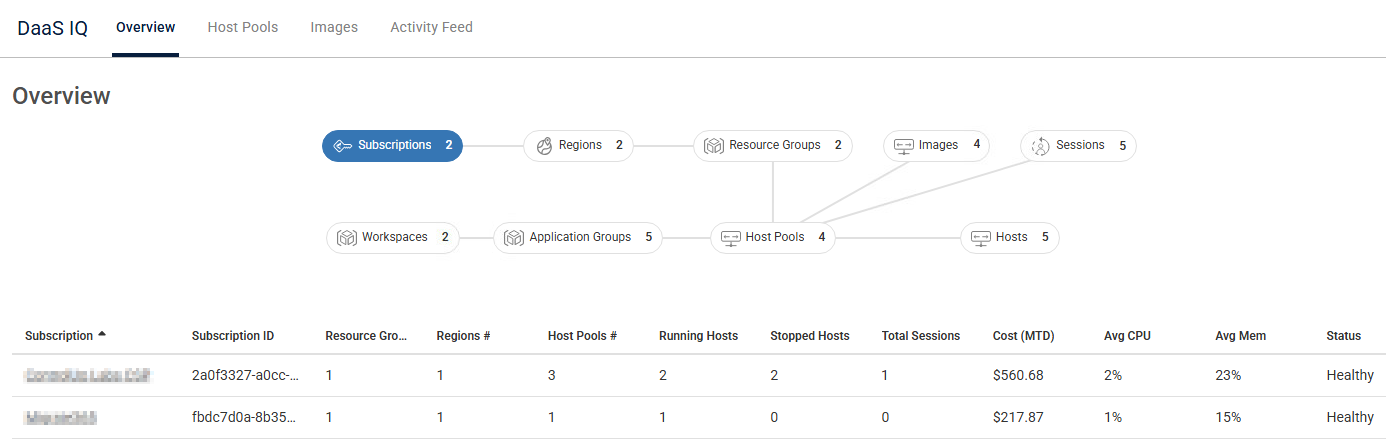
The DaaS IQ Overview page features an interactive Relationship Map that provides a clear, visual overview of your entire AVD topology. This dynamic map allows you to easily explore and drill down into specific environmental layers, including Subscriptions, Regions, Resource Groups, Host Pools, and more.
Clicking any node within the map instantly updates and rearranges the data grid below, filtering performance, capacity, and cost metrics to match your selected infrastructure entity.
Info Panel
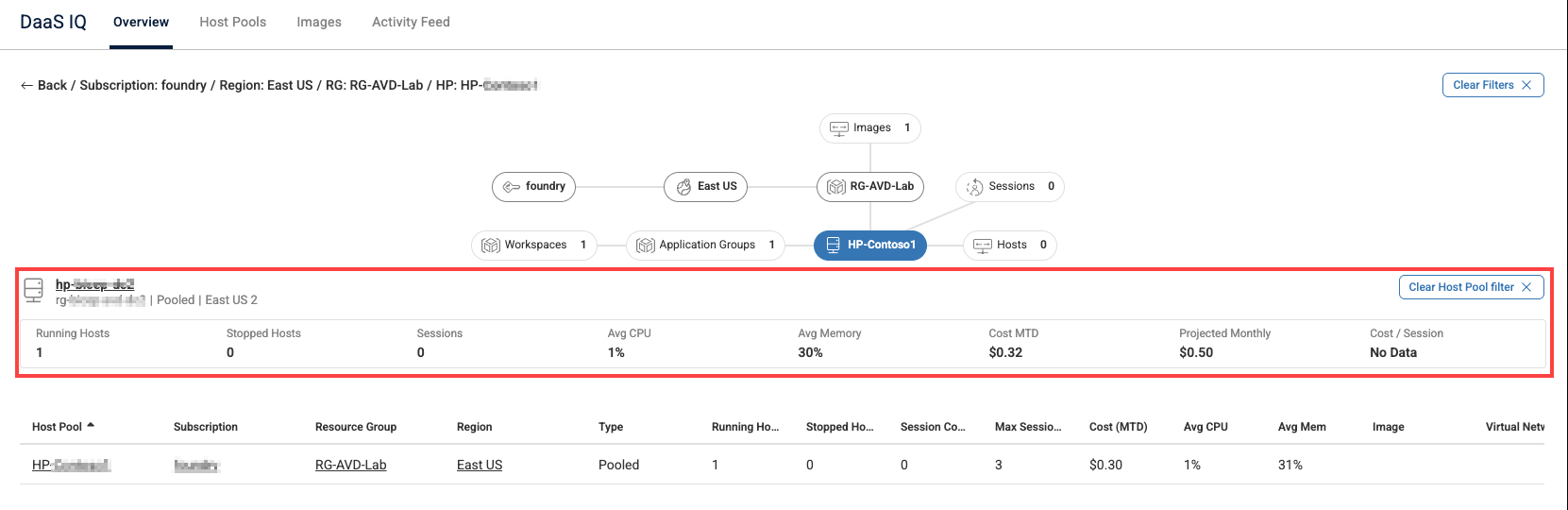
You can click the Host Pools node on the map and select a host pool from the data grid to display a contextual Info Panel. It shows key metrics for that specific pool directly below the map canvas. The Info Panel allows you to investigate performance and capacity metrics on the page without navigating away.
How It Works
DaaS IQ provides a unified approach to automate and simplify core operations:
Scaling: Policy-driven autoscaling with scheduled pre-start and OS disk optimization. Replace manual configuration and complex scripts with reusable, intelligent policies that align compute capacity with real-time demand. Autoscale policies are built around primary components: Shared Policies and a Scheduler.
Host Pools Management: Manage the entire lifecycle and inventory of session hosts and host pools through a single interface, offering real-time visibility into operational status while enabling direct actions like drain mode, restarts, deletions, and configuration updates.
Activity Feed: Visibility into a global, chronological view of all actions performed in DaaS IQ. It captures both automated system operations, such as autoscale, and manual user initiated tasks. This tab allows you to monitor exactly who performed an action, which resource was affected, and the final status of each operation. Click the Show System Events toggle to view system-generated actions only, like autoscale executions, scheduler triggers, and background jobs, in a single chronological list.
Image Management: Simplifies the lifecycle of golden images, including versioning and staged updates, to ensure environment consistency and prevent configuration drift.
FinOps: Cost-tracking widgets provide you with deep visibility into cloud spending and the financial impact of your autoscale policies.
Balancing Cost with User Experience
When DaaS IQ scales in hosts, it uses a controlled drain process to protect the user experience. Drain Mode notifies connected users and provides a grace period to save their work before the host shuts down.
How to Get Started
Configure the AVD prerequisites to allow ControlUp to manage your resources.
Configure autoscaling policies to start saving on infrastructure costs.
Configure host pool settings to define how session hosts are deployed in host pools.
Configure AVD golden images to manage editable golden VMs.