Read this article and make sure you meet the networking and AV exclusion prerequisites before you deploy ControlUp for Desktops.
Before you deploy
- Find your tenant URL.
- Meet the network requirements, including any firewall, SSL inspection, and proxy settings that apply to your environment.
- Add the antivirus exclusions.
- Verify connectivity with the ControlUp Tester tool.
Network requirements
Your tenant URL
Several requirements in this section use your tenant URL, <tenant-name>.sip.controlup.com. Your tenant name is unique to your organization, so you need to get it from ControlUp.
To find your tenant name, go to Devices > Configuration > Agent Registration.
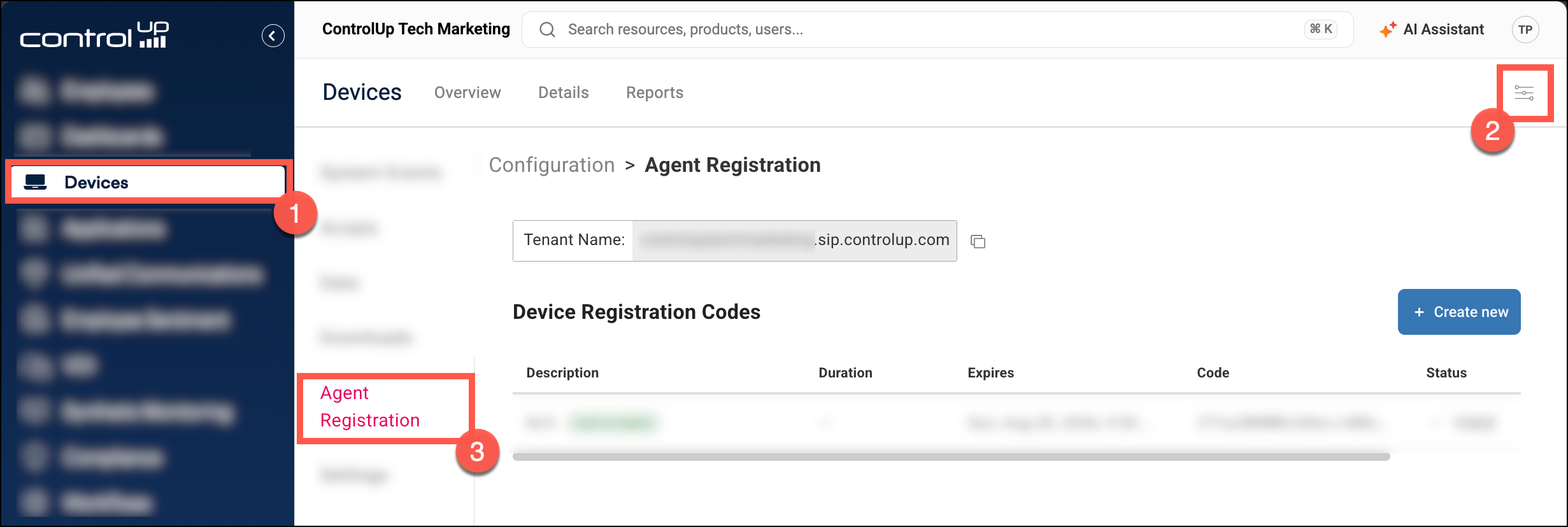
Replace <tenant-name> with your tenant name. For example, if your tenant name is acme-123, your tenant URL is acme-123.sip.controlup.com.
Managed devices
Devices with the ControlUp for Desktops Agent installed must be able to reach these URLs over HTTPS (TCP port 443). Your tenant URL also uses secure WebSocket (WSS) connections.
URL |
Required for |
|---|---|
<tenant-name>.sip.controlup.comFind your tenant name |
Also requires WSS. All agent communication with your tenant. Remote Control, Remote Shadow, and Remote Shell use a secure WebSocket (WSS) connection to this URL through your configured proxy. If you use domain-based firewall rules, see Domain-based firewall rules. |
downloads.sip.controlup.com |
Downloading agent versions. |
| One URL, depending on your region: US: agentblobeastus.blob.core.windows.netEU: agentblobwesteurope.blob.core.windows.netCanada: agentblobcanadacentral.blob.core.windows.net |
Uploading and downloading files with the file browser, and importing and exporting registry files with the registry editor. |
Add-on products
If you're licensed for any of these add-on products, your devices also need access to these URLs over HTTPS (TCP port 443). If you aren't, skip this section.
URL |
Required for |
|---|---|
cdn.spm.controlup.com/waapicdn.spm.controlup.com/agentsecuredx-cdn.controlup.com |
ControlUp for Compliance. |
Chromeedgedx.blob.core.windows.net/artifacts/appdx/latest/appdx_chrome.crxdownloads.sip.controlup.com/appdx/latest/appdx_chrome.xmlEdge and Island edgedx.blob.core.windows.net/artifacts/appdx/latest/appdx_edge.crxdownloads.sip.controlup.com/appdx/latest/appdx_edge.xml |
ControlUp for Apps, if you deploy the browser extensions from the ControlUp CDN. |
Chrome and Islandclients2.google.com/service/update2/crxEdge edge.microsoft.com/extensionwebstorebase/v1/crx |
ControlUp for Apps, if you deploy the browser extensions from the browser web stores. |
ControlUp console
To use ControlUp in your browser, you must have access to these URLs over HTTPS (TCP port 443). Your tenant URL also uses secure WebSocket (WSS) connections.
URL |
Required for |
|---|---|
<tenant-name>.sip.controlup.comFind your tenant name |
Also requires WSS. Remote Control, Remote Shadow, and Remote Shell need a secure WebSocket (WSS) connection to this URL. |
app.controlup.com |
The ControlUp console. |
google.com/recaptchagstatic.com/recaptcha |
Sign-in (reCAPTCHA). |
maps.google.com |
Map views in the console. |
edgedx-functions.azurewebsites.net |
Your first sign-in, when you create your tenant. You don't need this URL after your tenant exists. |
US: prod-dex-login-eastus.controlup.comEU: prod-dex-login-westeurope.controlup.com |
SAML SSO only. |
employee-cdn-prod.controlup.com |
The Employees dashboards. |
Requirement for domain-based firewall rules
Your tenant URL is a CNAME record that points to an Azure domain, which can be a load balancer or your ControlUp tenant directly. If you use domain-based firewall rules, you might also need to allow this intermediary domain. To find it, run nslookup on <tenant-name>.sip.controlup.com.

SSL inspection
If a proxy or firewall on your network performs SSL inspection, do one of the following:
- Install the trusted certificate on every device that has the ControlUp for Desktops Agent. Install it so that it's available to the computer account, not only the user account.
- Turn off SSL inspection for your tenant URL
<tenant-name>.sip.controlup.com.
Proxy server
You can configure the ControlUp for Desktops Agent to use a proxy server during Agent installation.
If your proxy is only open when a user account is signed in, and you want to monitor the device when no user account is signed in, configure your proxy to bypass the following URLs:
<tenant-name>.sip.controlup.comdownloads.sip.controlup.com
ZScaler VPN
If you are using a ZScaler VPN, follow the instructions in this article to ensure that you can see the real IP addresses of your devices.
Antivirus exclusions
Whitelist the following directories in your antivirus software (including next-gen security products such as Crowdstrike, Carbon Black, etc.):
C:\Program Files\Avacee\sip_agent\
C:\ProgramData\Avacee\sip_agent\scripts
C:\Program Files\ControlUp\AgentManager
C:\ProgramData\ControlUp\EdgeDx\UserSurveys
Alternatively, if you are unable to whitelist directories, you can whitelist the following executables:
C:\Program Files\Avacee\sip_agent\SIPAgent.exe
C:\Program Files\Avacee\sip_agent\RCNotifications.exe
C:\Program Files\Avacee\sip_agent\UserPrompt.exe
C:\Program Files\Avacee\sip_agent\WinFocusMonitor.exe
C:\Program Files\Avacee\sip_agent\Wow64MIHelper.exe
C:\Program Files\Avacee\sip_agent\Survey.exe
C:\Program Files\Avacee\sip_agent\SentimentUI.exe
C:\Program Files\Avacee\sip_agent\cu_rc.exe
C:\Program Files\Avacee\sip_agent\hookldr.exe
C:\Program Files\ControlUp\AgentManager\AgentManager.exe
Verify connectivity
After you've configured your network, download the ControlUp Tester tool on a device and run the ControlUp for Desktops tests to check that it can reach all required URLs.