ControlUp AI
ControlUp Connect (Jan 30)
ControlUp Connect empowers your end users and reduces IT workload with our AI chat right on their own devices, including:
Self‑Service: Users can open Connect to ask AI‑powered questions and quickly resolve common issues—without needing to contact IT.
Proactive Detection: If a potential problem is identified, Connect alerts users directly on their desktop, even before they notice an impact.
With Connect, help comes to the user’s device, enabling faster resolution, fewer tickets, and better productivity.
Connect’s Intelligent self‑service and proactive IT insights are powered by Pulse AI.
Pulse AI (Jan 30)
Pulse AI is ControlUp’s new AI‑powered command center within the ControlUp platform. It provides full visibility into AI interactions initiated from ControlUp Connect. Pulse helps you understand the issues your end users are experiencing. Pulse identifies patterns of issues, and enables you to continuously improve the employee experience automatically.
You can:
View end‑user AI interactions
Analyze patterns across your environment
Benefit from continuous and powerful AI learning
As the intelligence layer behind Connect, Pulse AI helps ensure your digital environments run smoothly by turning diagnostic data into actionable insights and constantly enhancing your end users’ experience.
AI Assistant for IT Operations (Jan 29)
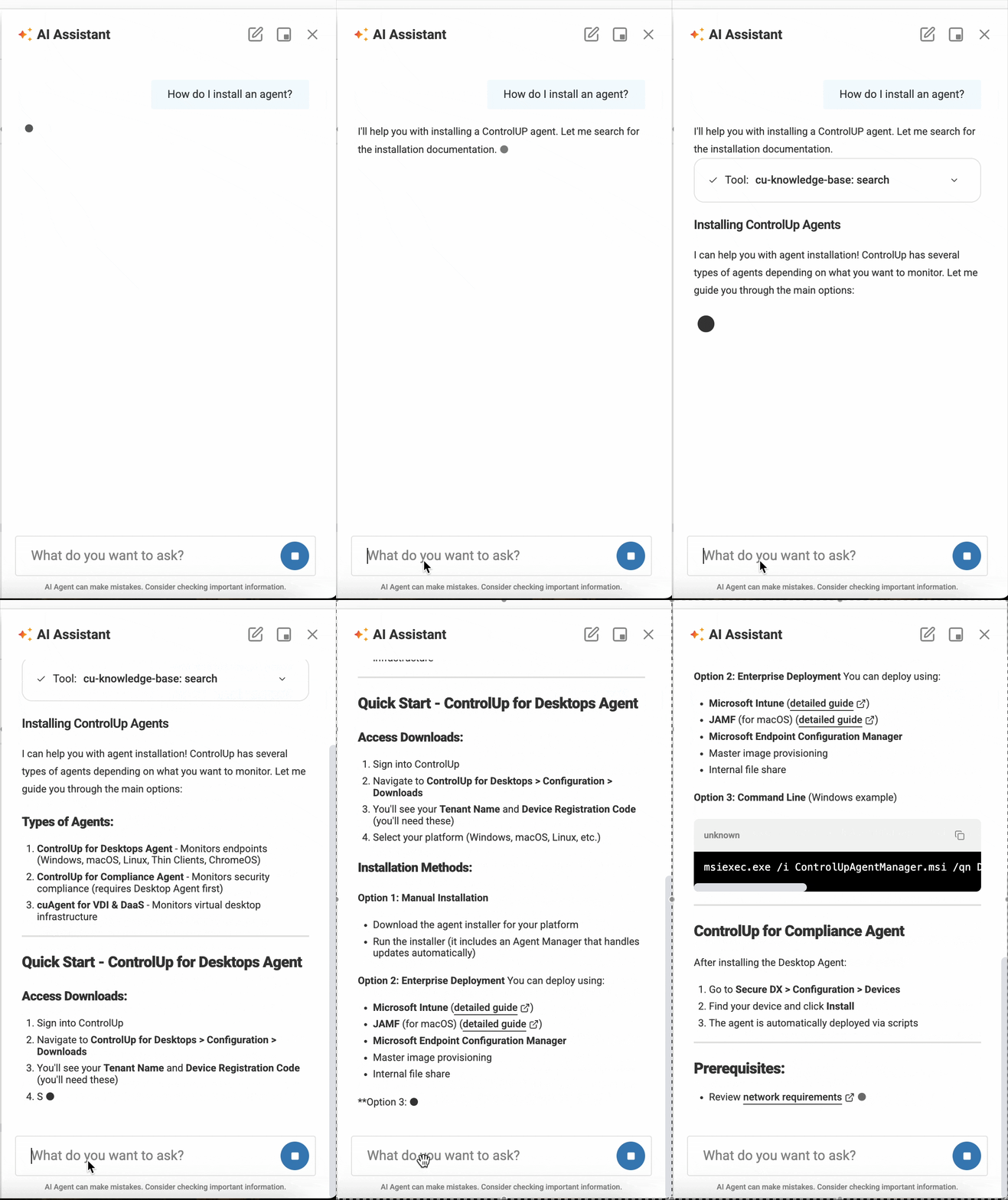
Announcing the launch of the ControlUp AI Assistant, an intelligent agent integrated directly into the ControlUp platform. By bridging the gap between natural language and technical execution, the AI Assistant transforms how you interact with your IT environment. The AI Assistant translates your conversational intent into actionable insights.
With this release, you can use natural language to gain visibility and take action across several core areas:
Advanced Troubleshooting: Quickly diagnose issues across devices, virtual machines, and specific applications.
Real-time Performance Metrics: Pull live data on system health, resource utilization, and user experience trends.
Synthetic Monitoring Insights: Query your Scout data to identify connectivity gaps or application availability issues instantly.
Administrative Oversight: Easily retrieve information regarding ControlUp users, permissions, and assigned roles.
Intelligent Automation: Receive smart suggestions for automating repetitive tickets, such as password resets and session management.
Knowledge at Your Fingertips: Query our public Knowledge Base directly within the chat interface.
ControlUp MCP Server (Jan 29)
The ControlUp Model Context Protocol (MCP) Server is a new integration layer that bridges the gap between your ControlUp environment and the world of AI agents. By implementing the open Model Context Protocol standard, ControlUp allows your AI assistants to "speak" directly to your IT infrastructure.
Third-Party AI Integration: Connect industry-leading AI agents, such as Microsoft Copilot, Cursor.io, and Claude Code, directly to your ControlUp data.
Granular Tool Management: Maintain strict control over your AI’s capabilities. You can selectively enable or disable specific tools for different product modules, ensuring the AI agent only has access to the operations you intend for it to use.
Structured Operations: MCP enables AI agents to invoke product-specific operations using a consistent, machine-readable schema.
Real-Time Context: Empower your AI agents with live telemetry and diagnostic data, allowing for faster troubleshooting and automated insight generation within your preferred workspace.
DEX Platform
Get Smarter Alerts with Anomaly Detection (Jan 29)
Instead of setting manual thresholds for alert conditions, Anomaly Detection monitors your environment to notify you and trigger automations when something goes wrong.
Time-based pattern recognition: Anomaly Detection can recognize daily or weekly patterns such as spikes during morning logins or weekly backups. The system can filter out expected patterns and alert you only when the monitored metric breaks its historical trend.
Integrate with Workflows: Anomaly Detection can trigger a flow with Workflows, our low-code automation product. Your options are limitless as you integrate flows with third-party applications and services.
New Home and Simplified UI for Devices Alerts (Jan 29)
We’ve moved the configuration for Devices Alerts to our centralized Events Management area. The updated UI makes it easier to manage alerts.
With the new intuitive configuration, you no longer have to be an expert in ControlUp’s data indices to configure alerts. We’ve added curated metric categories (such as System Health & Performance), with human-readable metric names that tell you exactly what’s being measured.
New location for your personal settings (Jan 27)
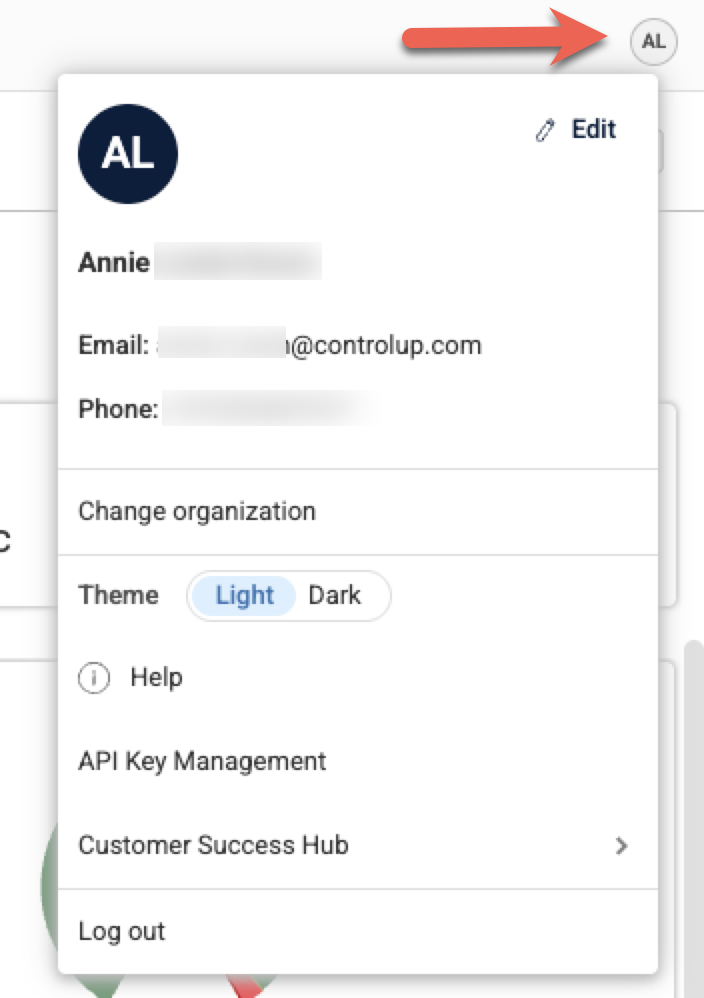
Your personal settings have moved from the bottom of the left-hand menu to the top right of the screen. These settings are identified by your initials and, depending on your permissions, can include your personal information, creating an API key, access to the Customer Success Hub, and the option to switch between light or dark mode.
ControlUp for Desktops
Device Health & Rightsizing Dashboard (Jan 30)
The Device Health & Rightsizing Dashboard provides a unified view of device health across your fleet. It aggregates performance, stability, and hardware lifecycle data into actionable recommendations for rightsizing, hardware replacement, and maintenance prioritization. A health score (0.0–10.0) is used to stack rank devices and identify those requiring immediate attention.
Windows Agent version 2.17.8 (Jan 30)
Added support for ControlUp Connect.
Live Remote Management (Jan 27)
This feature gives you a suite of new deep-dive troubleshooting and remediation tools for individual device monitoring and management. These tools give you near-instant precision with a 3-second refresh rate across live telemetry views including network, storage, and process activity. These features are available for Windows devices with Agent version 2.17.7 or higher.
Permissions
Find all permissions for these features under Device Permissions > Remote Management. For details, refer to the articles linked below.
Registry Editor
Perform remote registry management without interrupting the end-user session.
System Hive Access: View, create, and modify keys and values in HKLM, HKCR, and HKCC.
Import/Export: Support for .reg files allows for rapid deployment of configuration fixes or backing up keys before modification.
.png)
File Browser
Remotely access and manage device file systems. Perform file operations including upload/download files (up to 250MB), create folders, rename, move, copy, and delete files/folders.
.png)
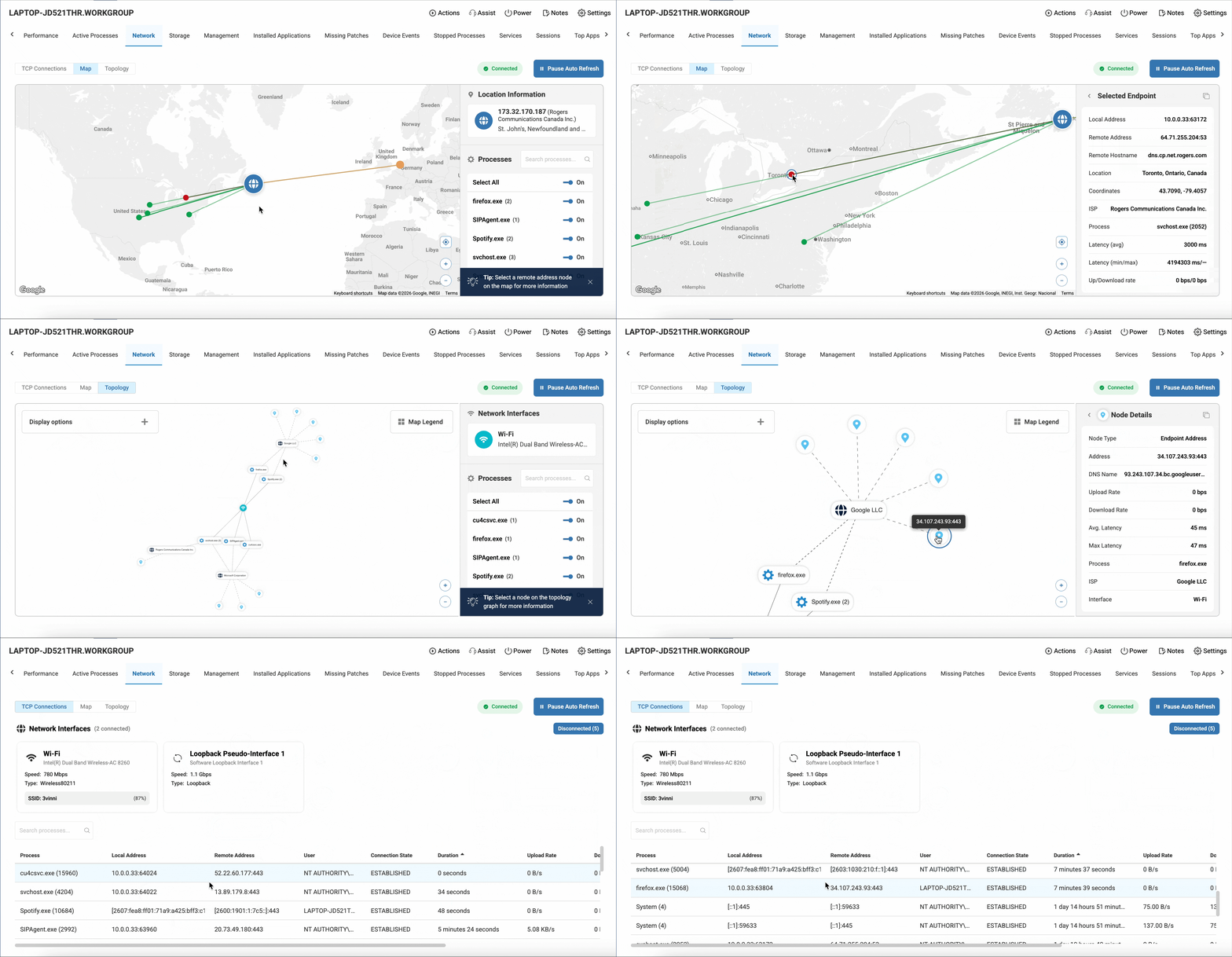
Real-Time Network Analysis
Gain immediate visibility into TCP network activity and connectivity health.
Live TCP Connections: View active connections, process-level attribution, and network interface status with a 3-second refresh rate.
Geographic Map View: Visualize connection destinations, ISPs, and latency to identify routing issues or suspicious outbound traffic.
Interactive Topology: A node-based map showing the relationship between processes, network interfaces, and endpoints.
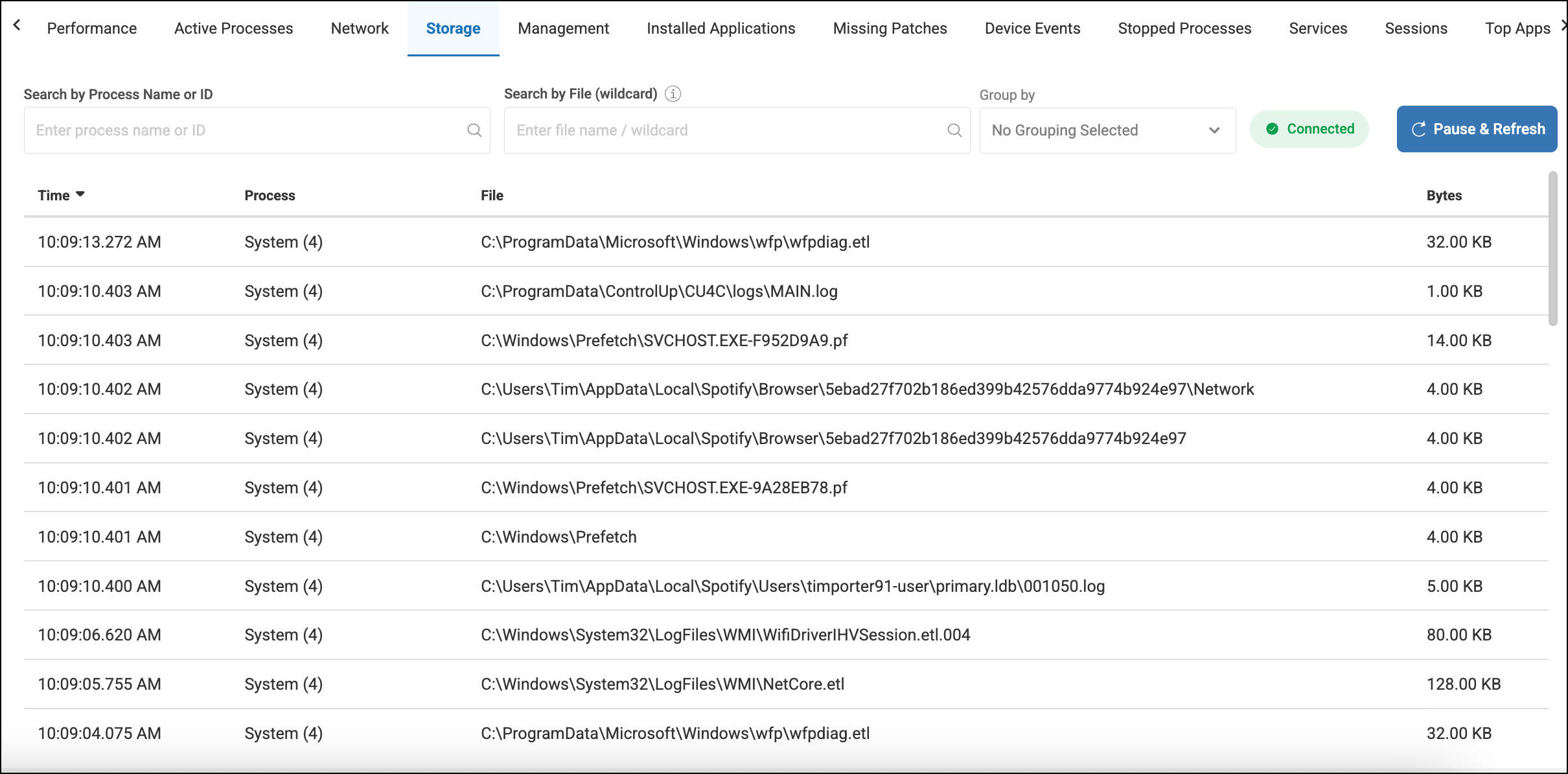
Real-Time Storage Activity
Monitor file system changes as they happen with a live view of all file write events including the specific process details.
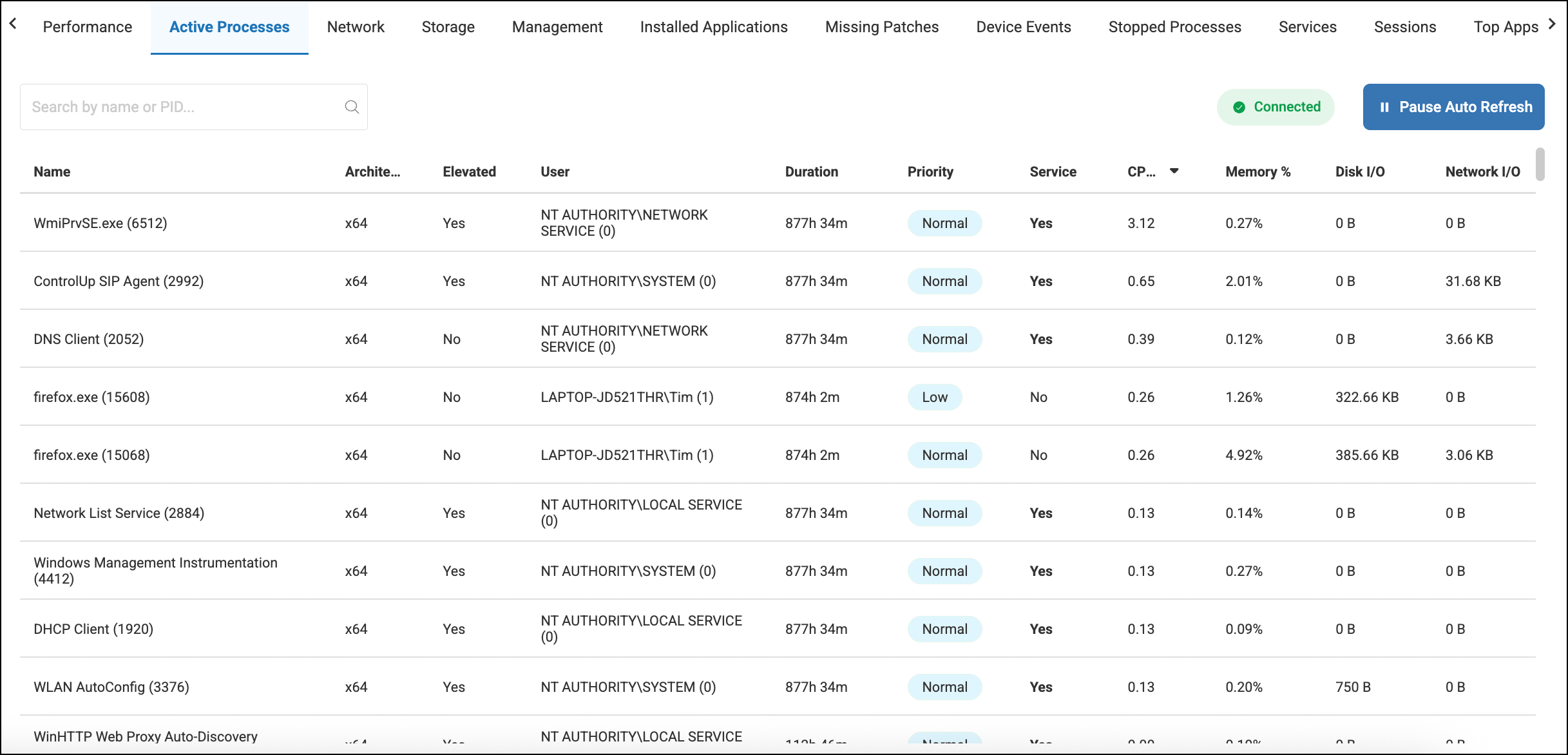
Active Process Details
Get a live view of all active processes.
Granular Metrics: Monitor CPU, Memory, and Disk/Network I/O (including Read/Write breakdown on hover).
Deep Inspection: Drill down into Threads, Loaded Modules (DLLs), and executable metadata.
Remediation: Kill frozen or unauthorized processes instantly via the "End Process" command.
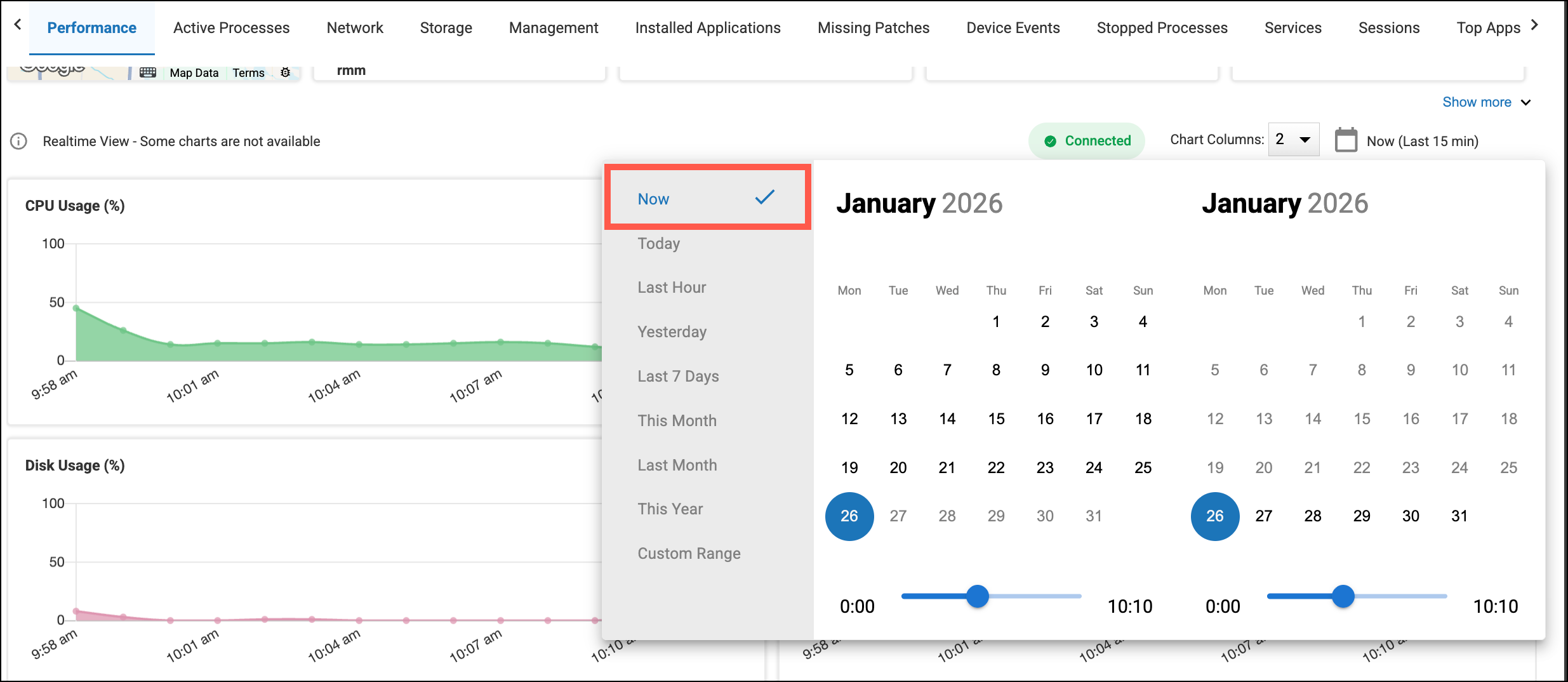
3-Second Metric Updates on the Device Details Page
When viewing the details for a specific device, you can now set the date picker to Now to start getting 3-second updates for more granular and real-time reporting.
Quickly search for employees (Jan 21)
Use the new search bar at the top of the Employees Dashboards to quickly get to an employee’s details page so you can start troubleshooting or fixing their problem. You can search for an employee by their display name, account identity (in the format of a UPN or email address), or by their device name.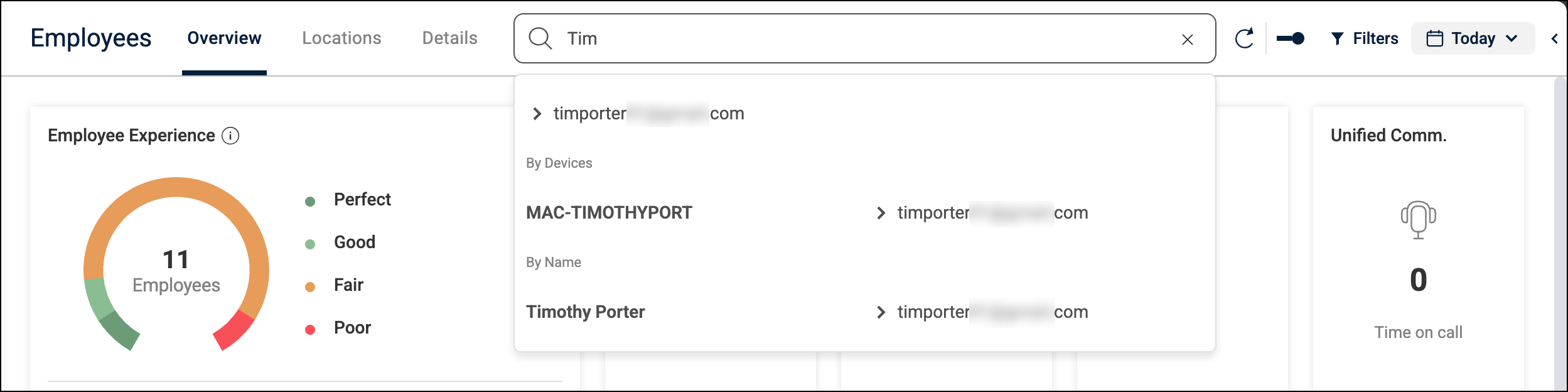
Windows Agent 2.17.7.7838 (Jan 4)
Features
Added support for live Remote Management features. Access is available by request only. Please coordinate with your ControlUp representative for more information.
Fixes
Improved Remote Control session reliability to prevent disconnections or initialization failures.
Employee Sentiment surveys:
Fixed an issue where "Once per user" surveys were being sent multiple times to the same user.
Fixed an issue where surveys continued to trigger after their scheduled expiration date.
Fixed an issue where surveys with short active windows failed to appear.
Fixed an issue where surveys were sent to the Windows Notification Center without displaying the intended toast notification.
Wi-Fi connection reporting fixes:
Fixed a failure in capturing Wi-Fi channel, RSSI, frequency, and noise data.
When Location Services is disabled, the Wi-Fi SSID now explicitly displays as PRIVATE to clarify that the lack of data is expected.
Fixed an issue where connected monitor information failed to update when connecting or disconnecting a monitor.
Devices with 0% battery health now correctly display “0%” instead of an empty value.
Fixed an issue where Blue Screen of Death (BSOD) events were not identified on devices using the Ukrainian language pack.
Fixed a data corruption issue affecting employee name strings.
Fixed an issue causing the gpu_usage_hf_samples field to be missing from the _devices data index.
Fixed an issue causing hardware model and OS names to be missing from data cached while the Agent was offline.
Fixed an issue causing the 32/64 bit column filter to not work on the Installed Apps tab of the Device Details page.
ControlUp for Apps
Optimize Costs by Identifying Unused SaaS Licenses (Jan 30)
ControlUp now helps you identify and reclaim unused SaaS licenses by comparing your contract entitlements with actual user activity. Add license details (license count and cost) for your App Groups, and ControlUp will show you your license utilization percentage and cost of unused licenses.
This data gives you the information you need to help reduce SaaS spend.
Easily Create Synthetic Tests for all your Monitored App Groups (Jan 30)
ControlUp for Applications gives you detailed real-world usage and performance data, but only shows a problem after your employees are affected. Now, we've integrated ControlUp for Applications with Synthetic Monitoring to let you easily create HTTP/S Scouts for all your monitored App Groups in just a few clicks. Get alerted when an app is down or slow so you can start working on a solution before the complaints come in. Go to the ControlUp for Applications dashboard to start creating the Scouts.
Redesigned and Improved Dashboards (Jan 30)
We’ve updated our application monitoring experience with two redesigned dashboards to give you actionable insights.
The Overview tab provides a high-level view into all of your App Groups including usage trends, underperforming applications, license utilization, and more.
The Details tab displays a list of all of your managed App Groups with key performance/usage metrics, and lets you drill down for deep-dive analysis.
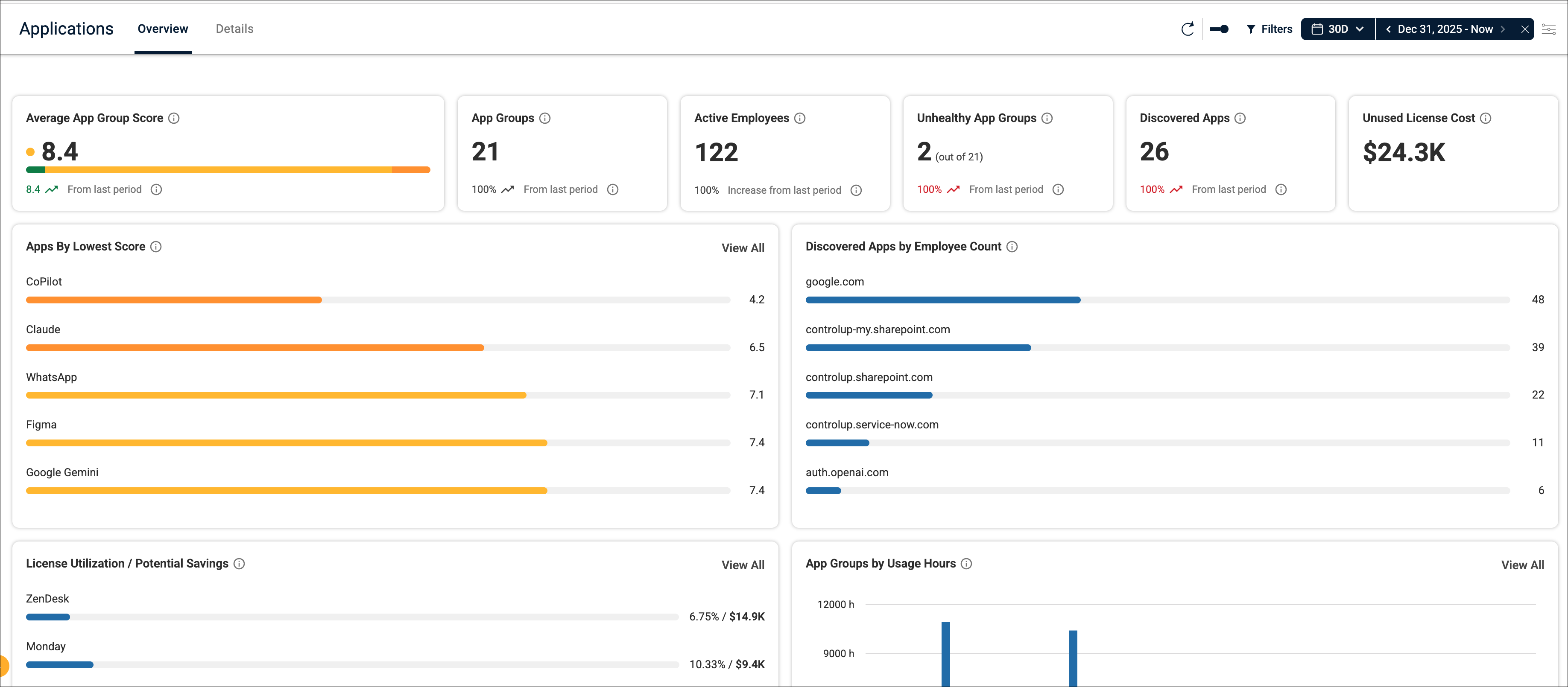
Discovered Apps Tracking (Jan 30)
We’ve introduced ‘discovered apps’ tracking to give you insight into usage metrics (number of visits and time spent) for applications that haven’t been configured as a monitored App Group. This feature can help you identify shadow IT and make decisions about officially onboarding or restricting certain applications. To start collecting usage data for discovered apps, you must enable Collect usage data for all domains under advanced Applications settings.
ControlUp for VDI
See details in the Latest VDI Version release notes.
For previous versions, see ControlUp for VDI (Real-Time DX versions).
Go to the Download Center to get this latest build for the Real-Time DX Console and Agents.
Need help? Contact your support representative.
Synthetic Monitoring
Note: Cloud and Custom hives are periodically released. For the latest information, see Cloud and Custom Hive Release Notes.
Monitor Scout Consumption per Hive (Jan 27)
When hovering over a custom hive in the Hives tab, you can now see a tooltip indicating the CPU and RAM consumption of all the scouts running on that custom hive.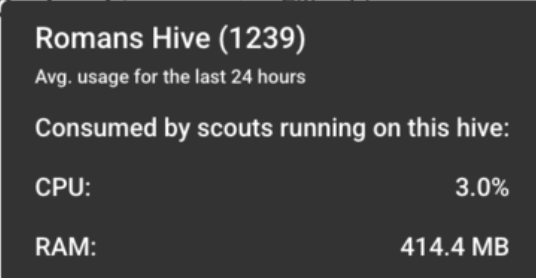
Workflows
Data Operations Nodes - New Array Comparison Actions (Jan 28)
We've introduced a powerful set of array comparison actions to the Data Operations nodes category, making complex array comparisons easier—no custom logic required. Your flows can now perform the following actions:
Difference Between Arrays: Identifies elements present in the first array, but missing from the second array, or vice-versa.
Intersection Between Arrays: Returns only the elements found in both arrays.
Symmetric Difference Between Arrays: Finds elements present in either array, but not in both arrays.
Union of Arrays: Combines unique elements from two arrays into a single list.
Loop Enhancements (Jan 21)
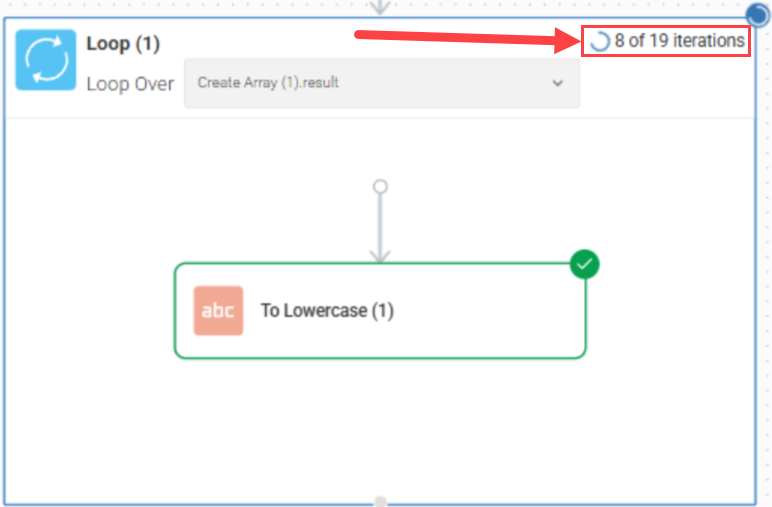
Autocomplete in Loop nodes is now more accurate and context‑aware when referencing iterated variables, making it easier to select the right data. Loop runs also display iteration progress (current vs. total), giving you clearer visibility into flow execution and run history.
Filter Search Capability (Jan 21)
We’ve added a search bar to the Filters field in supported nodes, making it much easier to find the exact criteria you need. This lets you quickly locate and apply filters without scrolling through long lists of options.
Flow Scheduling Enhancements (Jan 21)
When you run a flow on a Schedule trigger, you can now set excluded time windows. This allows you more granular control over your flows to define specific periods of time when the trigger won’t run—ideal for avoiding maintenance windows or peak business hours.
PagerDuty Integration Enhancements: New Actions (Jan 21)
We’ve enhanced the PagerDuty integration with new incident and event management actions. These new capabilities offer more precise control over incident processing and management, allowing you to create more sophisticated flows for incident response and notifications:
Acknowledge Event
Acknowledge Incident Add Note
Add Note to Incident
Create Service
Create Team
Create User
Get Schedule
Get Service
Get Team
Get User
List Escalation Policies
List On-Calls
List Schedules
List Services
List Teams
List Users
Reassign Incident
Resolve Event
Trigger Event
Update Service
Update User
Usability Enhancements (Jan 21)
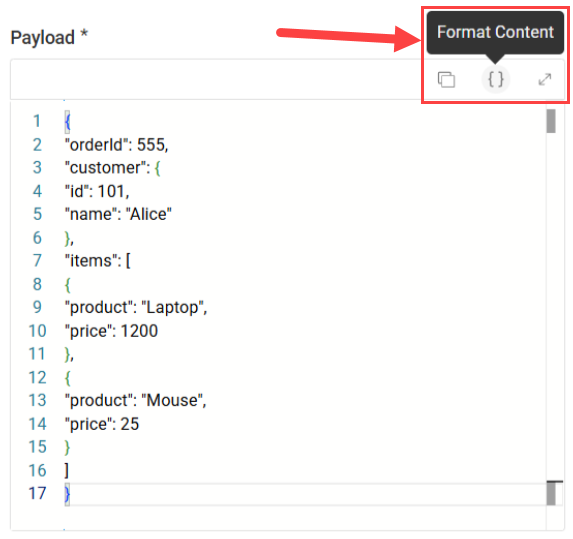
You can now resize and format the values you enter for JSON objects and arrays in your flow nodes. This makes it easier to view, edit, and manage complex JSON data.
Build Your Own Template (Jan 7)
You can now build your own templates, making it easy to save and reuse your most effective workflow patterns. This feature helps you maintain consistency across your automation library and jumpstart new projects, by leveraging complex logic you’ve already built.
ControlUp for Desktops Integration Enhancement: Better Script Handling (Jan 7)
We’ve improved how script responses are captured and processed in the ControlUp for Desktops integration. This enhancement ensures more reliable handling of script outputs, providing clearer and more accurate data for the next steps in your flows.
New ControlUp for Compliance Integration! (Jan 7)
Workflows now integrates with ControlUp for Compliance. This new integration allows you to automate tasks related to device compliance.
ControlUp Synthetic Monitoring Integration Enhancements: New Actions (Jan 7)
We’ve enhanced the ControlUp Synthetic Monitoring integration with new alert actions. These additions provide you more granular control over how alerts are managed and processed, enabling you to build more sophisticated incident response and notification workflows:
Create Alert Policy
Delete Alert Policy
Get Alert Policy Details
List Alert Policies for a Scout
List All Integrations
Update Alert Policy