Pulse AI
View per-user AI Assistant credit usage (Oct 19)
You can now see how many AI Assistant credits each user consumes, along with your organization-wide totals.
To view it, go to Settings > Subscription > Usage over time, scroll to the AI Assistant utilization over time chart, and click View credit usage.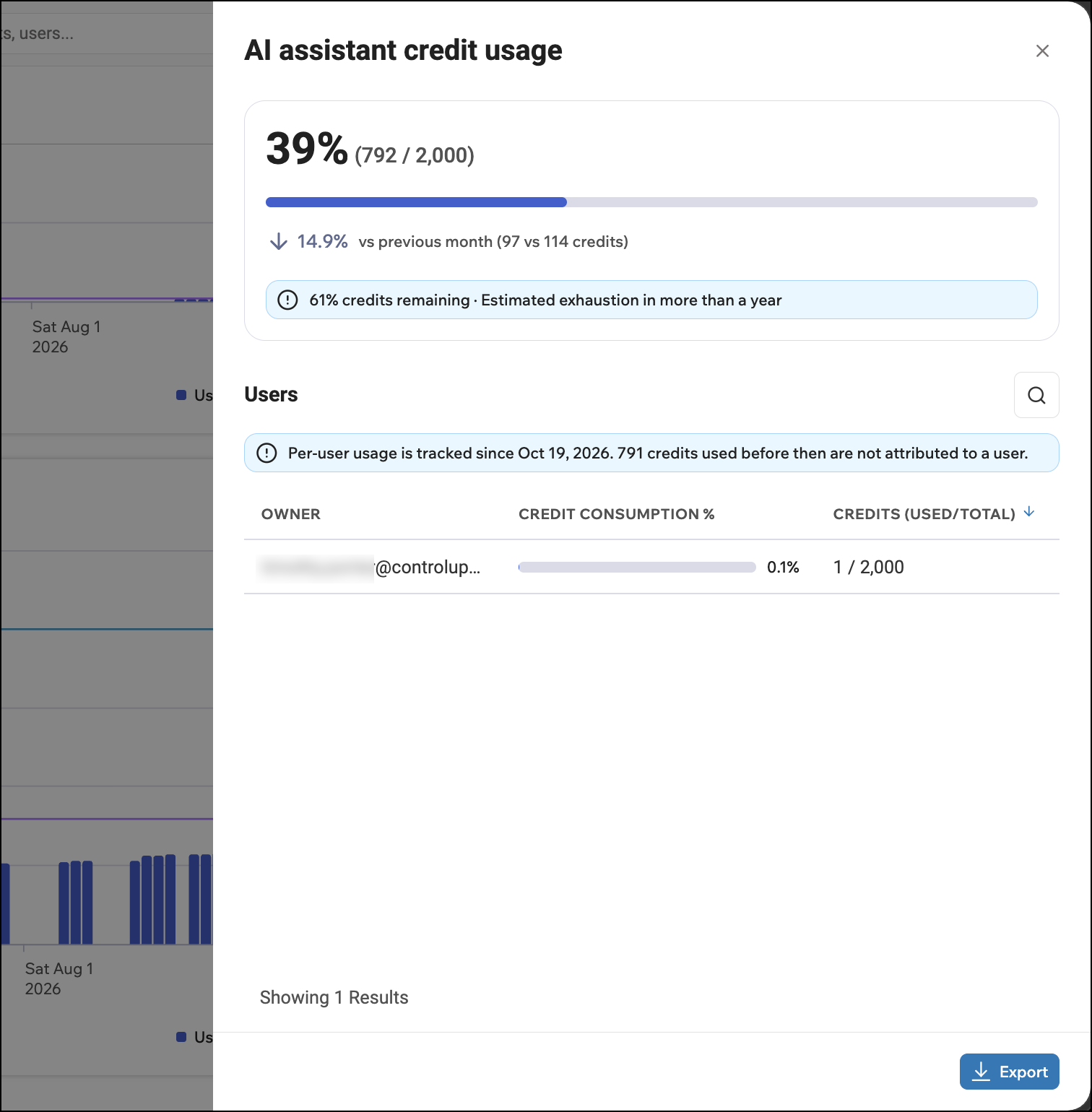
(Private Tech Preview) Major update to Pulse AI Resolve (Oct 14)
Note
This update is currently in private tech preview and is available only to certain customers. Contact your ControlUp representative to learn more.
ControlUp Connect is now called Resolve. Pulse AI Resolve is an on-device self-service hub that can diagnose and fix device issues and answer employee questions so employees don’t have to open a support ticket.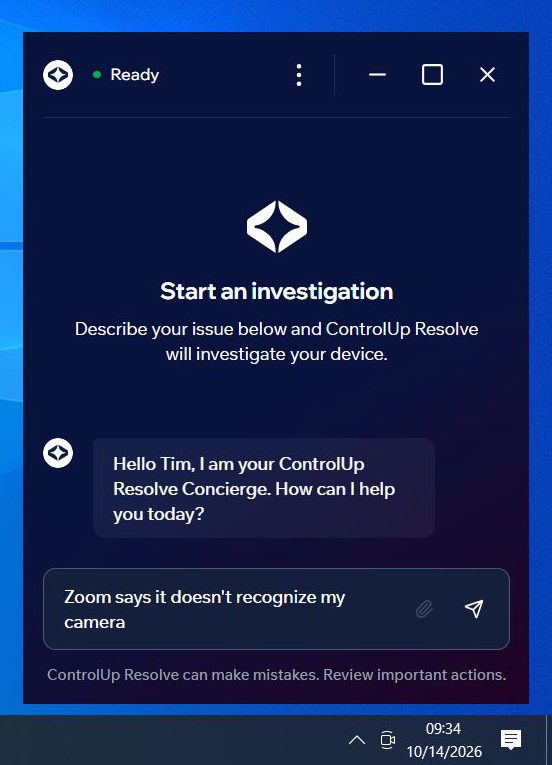
More than just a rebranding, this update brings major new features and enhancements in the following areas:
You stay in control of what Resolve can do
Approval requirements - Decide which actions Resolve is allowed to run automatically, and which require approval from a human administrator.
Escalation control - Control which types of investigation models are allowed to run, and how investigations escalate to more advanced models before a human gets involved.
Guardrails - Create custom guardrails to define what Resolve must never do.
Patterns-only mode - For maximum safety, restrict certain devices only to solutions that have already been reviewed and approved by your team.
Expand Resolve’s capabilities
MCP connectors - Let Resolve run actions in other systems, such as identity or security tools, with per-action control over what requires approval.
Knowledge base integrations - Connect your internal knowledge base so Resolve can give employees answers specific to your organization and troubleshoot with your team's own guides.
Notifications and ticketing
Webhooks - Get alerted in Slack, Teams, PagerDuty, and more when an investigation needs attention, or keep ITSM tickets in ServiceNow, Jira, or Freshdesk in sync automatically.
Built-in notifications - In-app notifications let you know which investigations need your attention. You can also send these through third-party communication apps or email.
Customization
Add your own branding - Customize the look and feel of the Resolve application to be seamless with your in-house style.
(Public Tech Preview) AI Assistant now supports more Compliance actions (Oct 8)
You can now do more work with your ControlUp for Compliance data through our AI Assistant. For example, you can:
Get detailed breakdowns of the issues found in your environment.
Get a report with the latest status of each installation action started during a certain time range, either for a specific Template or Job, or across your whole environment.
Start a remediation Job to fix an issue, including setting a schedule and defining remediation behavior.
These updates are in public tech preview and ready for you to try. For a full list of the new actions you can perform, refer to the API documentation.
Platform
Morning Coffee MSP Dashboard (Oct 19)
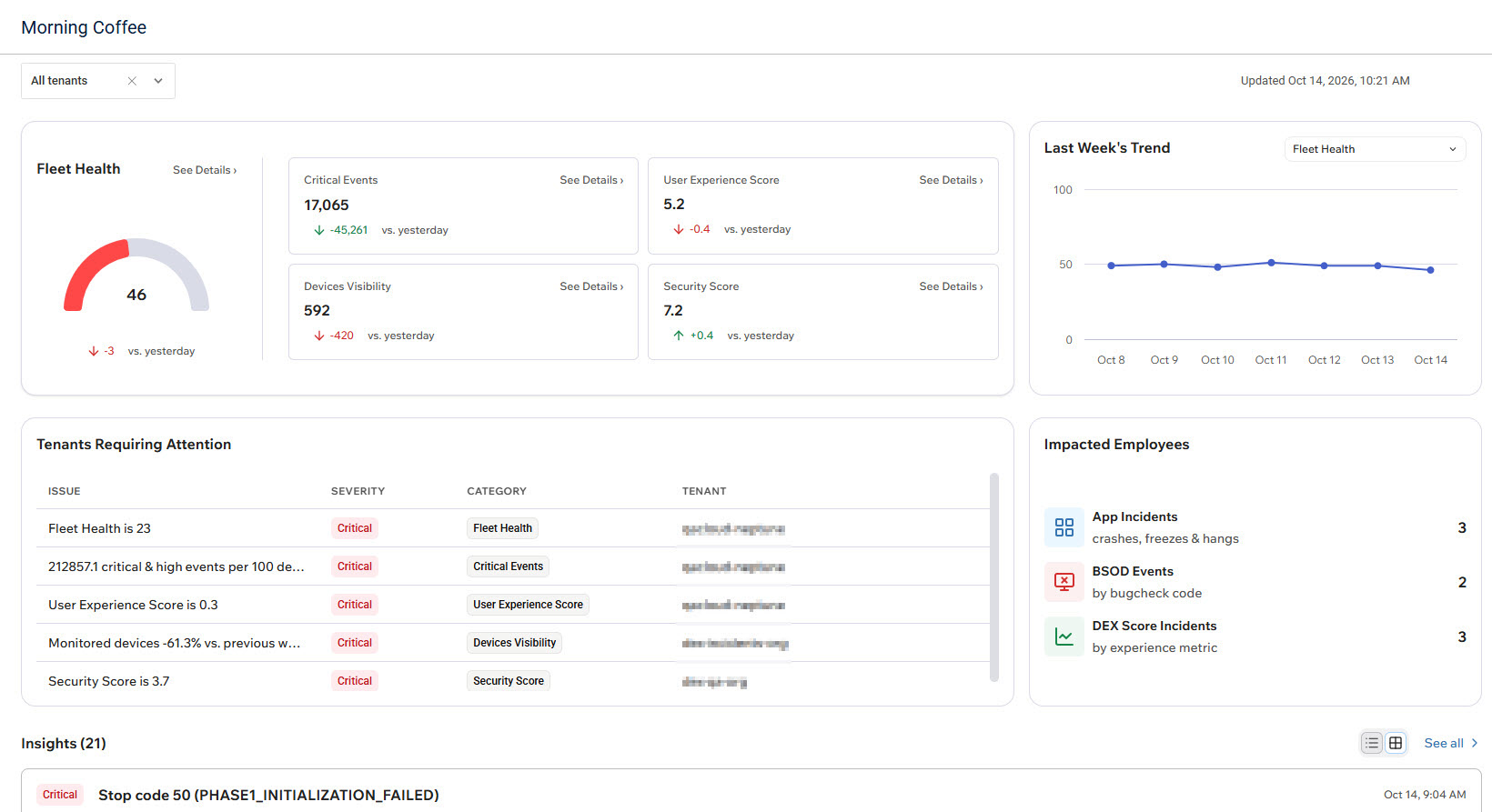
Morning Coffee is a new MSP dashboard that gives you a single, ready-to-use landing experience for daily operations across all your managed tenants. It aggregates fleet health and critical issues requiring attention into one unified view. This empowers you to quickly see what needs attention and act on it using the AI Assistant. The Morning Coffee dashboard is available immediately upon onboarding.
Tenant Manager: Default Home Page (Oct 19)
You can now choose where users land when they sign in to your tenant. To set your default home page, click Settings > User Settings > Set Default Home Page, and select one of the new options:
Morning Coffee
Tenant Manager
Blueprints
Audit Log Enhancements (Oct 19)
The DEX platform Audit Log has been refreshed to make investigations and reporting faster:
Updated table layout and controls make the log easier to scan and filter.
Clicking any event now opens a details drawer with the full picture: timestamp, actor, action, entity, source, context, and before/after values where relevant, with a one-click copy for the description.
You can toggle the displayed time between Local time and UTC to match whatever system you’re correlating against.
Hide Inaccessible Products From Your ControlUp Users (Oct 19)
Product areas that you can’t access are now hidden from the left sidebar instead of appearing grayed out with a tooltip. This gives you a cleaner UI that shows only the products you’re authorized to use.
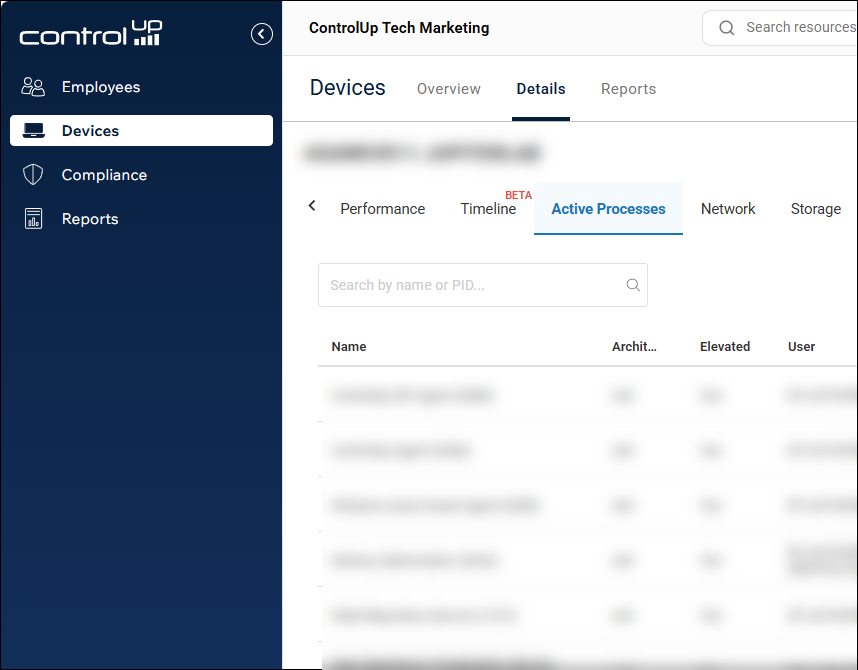
A product area is hidden if your organization doesn’t have a valid license to use it, or if the ControlUp user doesn’t have the right permissions to use that product.
Note that if you have the Manage Subscriptions permission (included in the default Admin role), you’ll still see all product areas even if you don’t have a valid license. This allows you to start a trial for those products.
ControlUp-hosted MCP server (Oct 13)
You can now connect your AI agents directly to ControlUp with a ControlUp-hosted MCP server. There is nothing to install or maintain.
Once connected, you can ask questions about your ControlUp environment in plain language, for example “List the roles in my organization,” and the agent retrieves the data for you. The server covers the ControlUp Platform, ControlUp for Desktops, ControlUp for VDI, ControlUp for Compliance, Synthetic Monitoring, and Workflows.
Previously, you had to host the MCP server yourself. With the ControlUp-hosted option, there is no installation necessary. Just use the server for your region and provide an API key.
Tags in Tenant Manager (Oct 8)
You can now create tags in a tenant manager and use them in all the individual tenants that are connected to that tenant manager. See Centralized Tags Management for details on how to work with tags throughout the product.
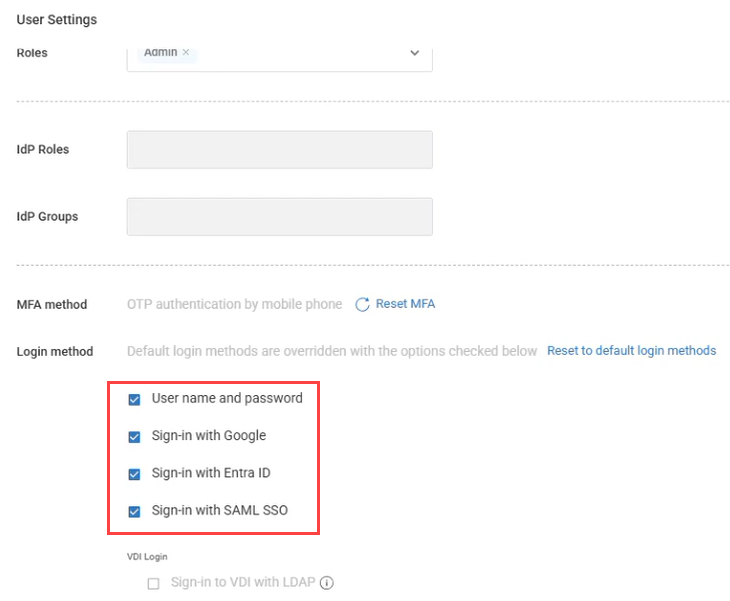
User-level login method override (Oct 5)
You can now override login methods for individual users, independent of your organization's global authentication settings. This includes enabling a login method for a specific user even if it isn't allowed organization-wide, such as a break-glass method for emergency account access. This gives you greater flexibility to support users with different authentication requirements within the same organization.
Tenant Manager Blueprints (Oct 5)
Blueprints makes it easier for admins of multiple tenants and MSPs to standardize and replicate configurations across tenants without having to configure everything manually. With Blueprints, you can:
Create reusable configuration templates
Copy supported entities and settings between tenants
Override existing configurations or add new ones
Review changes with versioning and diff preview
This helps you save time, reduce configuration errors, and keep environments consistent at scale. The following configuration types can be copied from a source tenant to target tenants:
Alert rules
Workflows
Scripts
Event logs
Dashboards
Custom roles
You can choose a deployment mode to override existing or add to existing when creating a blueprint. When you run a blueprint and select the target tenants, you can preview the impact details of exactly what will be copied and what won’t. Once the blueprint is executed, you can view the run status of each configuration type.
A log is maintained of every blueprint run so you can go back and view the job history of which blueprints were run, all its details and what the impact was on every target tenant.
Dashboards
Drill-down from Your Dashboards (Oct 5)
Dashboards just became a lot more actionable!
Anywhere you see a device count in a dashboard, you can now click that number to drill directly into the Devices page, automatically filtered to show those specific devices. From there, you can immediately investigate further or perform actions on those devices.
This creates a much smoother workflow from insight to investigation to action, without having to manually recreate filters or search for the affected devices.
New Dashboards (Oct 5)
Disk Cleanup Results
Built for the new Disk Cleanup script, this dashboard gives you visibility into cleanup results across your environment, making it easy to see what was cleaned up and the impact across your devices.
Device Registration Failure Tracking
Quickly identify devices that are failing to register. This is especially useful alongside the recent changes to refreshing registration codes, helping you spot and investigate registration issues across your environment.
ControlUp for Desktops
Dell ThinOS Agent version 2.18.0.49951 (Oct 22)
The ControlUp for Desktops Agent is now available for Dell ThinOS 10 devices. You deploy the agent as a CI (Customer Installed) application package through Dell Wyse Management Suite (WMS), using a .cfg file that connects your devices to your ControlUp tenant.
The agent supports device health and performance monitoring, Remote Control, script actions, and more. See the supported features.
Known issues
Monitor details don't update after display setting changes. If you change a monitor's orientation, resolution, or position in the ThinOS display settings, ControlUp continues to show the monitor's native values. Monitor details refresh only when a monitor is connected or disconnected, and even then they show the native values. In addition, after the agent restarts or the device reboots, the monitor count may show 0 until a monitor is disconnected and reconnected.
Proxy settings in the .cfg file are not applied. The agent ignores the
proxyandproxy_test_ipvalues in the .cfg file and connects directly, without a proxy. Devices that can reach ControlUp only through a proxy can't connect to your tenant.
Enrich browser extension version 2.0.35 (Oct 13)
Enrich now supports the following live remote management features:
File browser
Registry editor
Active processes (list only, no details drilldown)
Windows Agent version 2.18.1.9515 (Oct 8)
Fixed an issue with the
ONLYSTARTONBOOTinstallation flag which caused problems with golden image deployments.Fixed an issue causing network usage stats to intermittently report empty values and log Event 2213.
cuconnect.exe now launches only when the required extended settings are enabled.
Mac Agent Manager version 2.18.4.4107 (Oct 5)
macOS Agent version 2.18 now officially supports macOS 27
This Agent Manager version includes fixes for installation issues on macOS 27. With these changes, macOS 27 is now officially supported.
Changes
The macOS Agent Manager installer is now distributed as a .pkg file instead of a .dmg. This fixes an issue that caused the tenant information step of the installer to not appear when you manually performed a fresh install on macOS 27.
Known issues
Manually running the Agent Manager installer over an existing installation on macOS 27 displays a generic administrator access request prompt for InstallerRemotePluginService-arm64 (Installer) instead of a prompt with the ControlUp icon and branding. The prompt allows the installer to read the current tenant and device registration code and prefill them.
Compliance
ControlUp Audit Log (Oct 5)
Every configuration change made in Compliance is now recorded in the ControlUp platform Audit Log, so you can see who changed what, when, and from which IP. This covers creating, editing and deleting templates, jobs and custom issues, plus changes to agent version configuration, ADC, integrations, user risk analysis and workflows.
Use it to keep accountability for configuration changes, trace an unexpected rollout or score change back to its cause.
ControlUp for VDI
See details in the Latest VDI Version release notes.
For previous versions, see ControlUp for VDI (Real-Time DX versions).
For Remote Clients, see Remote Clients Plugins.
Go to the Download Center to get this latest build for the Real-Time DX Console, Agents and Remote Clients.
Need help? Contact your support representative.
Synthetic Monitoring
We continuously release Cloud and Custom hives. To keep your hives and scouts updated, be sure to use the latest and see what we released here:
Cloud and Custom Hive Release Notes.
Enabled Scouts Now Displayed by Default (Oct 8)
The scouts table now hides disabled scouts by default for a cleaner view. To display disabled scouts, change the filter for the table.
Workflows
ServiceNow CMDB Actions (Oct 20)
Added six ServiceNow CMDB actions for working with configuration items and relationships:
Create or Update CI
Get CI Relationships
Get Configuration Item
List CI Classes
List Configuration Items
Update CI Attributes
Create or Update CI uses ServiceNow Identification and Reconciliation to match existing CIs and avoid creating duplicates when the same identifying attributes are used.
Improvements and Fixes (Oct 20)
List Users, List Groups, and List Applications for Microsoft Entra ID can now return only selected fields instead of all available fields, helping reduce response size when the full object is not needed.
Improved action error messages so failed actions surface the most useful error information first.
Check for Empty Values in If-Else (Oct 13)
Added Is Empty and Is Not Empty operators to the If-Else node, making it easier to branch a flow based on whether a value contains data without using comparison workarounds.
Retrieve All Citrix Cloud Results Automatically (Oct 13)
Citrix Cloud list actions can now retrieve all available results with Return All. Turn it on to automatically retrieve each page of results instead of manually working with Limit and Continuation Token. Leave it off to retrieve results page by page.
Apple Business Integration (Oct 13)
Added an Apple Business integration for working with device inventory in flows. Actions are available to list and retrieve devices, check Activation Lock status, and retrieve AppleCare coverage.
Expanded Windows 365 Management (Oct 13)
Added Windows 365 actions for managing user settings, importing and managing snapshots, and restoring Cloud PCs.
Improvements and Fixes (Oct 13)
Improved Citrix Cloud actions with clearer field guidance, realistic examples, and pagination tips.
Improved loading on the Flows tab so the interface becomes available sooner while additional flow data loads.
Refreshed Workflows with updated layouts and styling across the Overview page, tables, and the Flows, Forms, and Templates tabs.
Updated Top Flows and Top Actions to highlight the top results and group the remaining results under Other.
Input Variables can now be marked Required for API-triggered flows. API requests that omit a required input variable or provide an empty value are rejected with an HTTP 400 error.
Added Remove New Lines to String Manipulation to convert multi-line text into a single line by replacing line breaks with spaces.
New Integrations: Splunk, Netskope, and Microsoft Defender for Endpoint (Oct 8)
Workflows now supports integrations with Splunk, Netskope, and Microsoft Defender for Endpoint, adding actions for Splunk searches and notable events, Netskope security and DLP data, and Defender device investigation and isolation.
Expanded ServiceNow Integration (Oct 8)
The ServiceNow integration now supports OAuth 2.0 client credentials in addition to Basic authentication.
New actions are also available for Event Management, Asset Management, and service catalog data.
New Workflow Data and Query Capabilities (Oct 8)
Flows can now use the Run namespace to access how a flow was started and information about the user who initiated it.
Get Group Transitive Members retrieves users from nested Microsoft Entra ID groups at any depth.
New Query Metrics, Get Tables, and Get Table Fields nodes let flows discover and query ControlUp for VDI metrics directly.
Extract Values extracts a property from each item in an array and returns the values as a flat list, including nested properties using dot notation.
Improvements and Fixes (Oct 8)
Date and time filter fields now provide date/time selection and show conditions appropriate for those fields.
Get Device Performance now supports 10-minute and 1-hour durations.
Count Array can now use array outputs from previous nodes directly.
Listener nodes now highlight missing required configuration directly on the node.
Updated the Microsoft Entra ID required API scopes to include permissions needed for BitLocker recovery keys, password resets, and revoking user sessions.
Fixed an issue where actions in shared custom integrations could be visible only to the user who created them.
Fixed issues affecting the Tag Devices from Entra ID Group Membership, License Reclamation via Entra ID Groups, and password-expiry notification templates.
Fixed an issue where locked variables could fail to resolve correctly in some regions.
Fixed workflows that displayed as running even after the run had completed or had been canceled.
Fixed Get Device Performance runs that could appear successful even when no performance data was returned because of an error.
Fixed references to properties inside JSON returned as text, including JSON values returned by Splunk searches.